
Guestbay icon
Guestbay icon

Guestbay

 1 like

Virtual machines that set themselves up: Windows installed unattended, Linux cloud images ready to use, and macOS, in a native QEMU app for Windows, Mac and Linux.
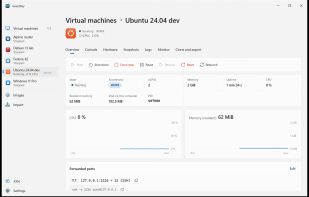
A virtual machine's overview on Windows: state, CPU and memory, forwarded ports

Cost / License

  • Pay once
  • Proprietary

Application type

Platforms

  • Mac  macOS 13+ on Intel, macOS 15+ on Apple silicon. Uses QEMU from Homebrew or MacPorts (installs it if missing).
  • Windows  Windows 10 1809 or later, x64 and ARM64. The Microsoft Store edition includes QEMU; the download uses (or installs) QEMU.
  • Linux  x64 and ARM64. Uses the distribution's QEMU and KVM; the Flatpak includes QEMU.
  • Flatpak
  • Homebrew
1like
0articles
Save

Features

Properties

Features

Highlights All activities

Guestbay News & Activities

Recent activities

Guestbay information

  • Developed by

    AU flagOntiqo
  • Licensing

    Proprietary and Commercial product.
  • Pricing

    One time purchase (perpetual license) that costs $30.
  • Alternatives

    11 alternatives listed
  • Badge

    Get an embeddable badge for Guestbay
  • Supported Languages

    • English

AlternativeTo Category

Network & Admin
Guestbay was added to AlternativeTo by brharrow on and this page was last updated .

No comments or reviews, maybe you want to be first?

Official Links

What is Guestbay?

Guestbay creates and runs virtual machines with QEMU, without the command-line flags. Pick a template, fill in a few details, and the virtual machine sets itself up.

Guests

  • Windows 10 and 11 install unattended from Microsoft's ISO: pick a user name and walk away. Windows 11 on ARM too.
  • Linux cloud images for Ubuntu, Debian, Fedora, CentOS Stream, AlmaLinux, Rocky Linux, openSUSE, Arch and Alpine boot with your user, SSH key and packages, downloaded from their publishers with checksums checked. Or use any installer ISO.
  • macOS: on an Apple silicon Mac, Guestbay downloads macOS from Apple and installs it with Apple's own virtualization. Elsewhere through OpenCore, with tested settings.
  • Other processor types too: x86-64, 32-bit x86, ARM64, 32-bit ARM, RISC-V and PowerPC.

Everyday work

  • Each virtual machine's screen in a tab, full screen, Send keys for Ctrl+Alt+Del, paste as typing, screenshots.
  • Start, shut down, pause and watch CPU and memory live; a warning when a guest falls back to slow emulation; logs and QEMU's monitor a tab away.
  • Every hardware setting has a plain name and explanation, and only what your QEMU supports is offered: CPU, memory, UEFI, disks, network, display, port forwards, USB, boot order.
  • Share folders with a virtual machine, read only if you like; copy and paste text, pictures and files both ways, and drag files onto the console. Guest tools install themselves.
  • Snapshots; resize, clone and convert disks; export and import virtual machines; paste a QEMU command line to bring one in.
  • Use Guestbay from a browser on your network over HTTPS, behind a password.
  • The QEMU command is shown before each start, to copy or run yourself. Virtual machines are plain folders and keep running when you close or quit the app.

Native on each system: Mica and the tray on Windows, a toolbar, Settings window and menu bar icon on the Mac, GTK 4 and libadwaita with KVM on Linux. x64 and ARM64; Intel and Apple silicon.

30-day free trial with every feature; then a one-time US$29.99 licence covers 2 computers on any mix of Windows, Mac and Linux. Also in the Microsoft Store, with QEMU built in.
