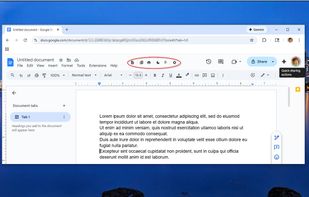
Meet Google Docs Shortcuts, the Chrome extension that turns routine clicks into swift actions. It adds an elegant toolbar and context actions that save time and reduce friction. With one tap, you format, count, export, and switch themes without hunting menus. The result: smoother focus and fewer interruptions from your writing flow.
Value you’ll feel right away
1?? One-tap access to strikethrough Google Docs for quick edits ?
2?? Instant how to check word count during drafting
3?? Fast how to convert Google Doc to pdf for sharing
Google Docs shortcuts streamlines repeated steps you perform every day. It places reliable controls where your cursor and attention already are. No clutter, no heavy learning curve. Just clear buttons that work the same way, every time, across documents.
Pain points this solves
? Lost minutes spent recalling strikethrough shortcut while editing
? Reopening menus for how to show word count on Google Docs in long drafts
? Manual steps for how to save a doc as a pdf before deadlines
? Extra clicks for how to print the document when you just need a page
With Google Docs Shortcuts, each action is one click, not five. Toggle dark mode when your eyes need a break. Trigger word count as you revise, not after. Convert and print with confidence, even when your schedule is tight.
Key benefits and features
One-click how to strikethrough directly from the toolbar
Zero-guess how to see word count while typing
Simple how to turn a Google Doc into a pdf for clean exports
Friendly dark mode that respects your workspace
GOOGLE DOCS SHORTCUTS is designed to be minimal and dependable. It respects your habits instead of forcing new ones. Buttons are labeled clearly, and tooltips explain each step. You stay focused on ideas while the extension handles the mechanics.
How it works step-by-step
? Install, grant standard access, and open any document
? Use how to do strikethrough on Google Docs for fast revisions
? Tap word count to monitor progress in real time
? Export with how to save google doc as pdf when you’re done
GOOGLE DOCS SHORTCUTS brings the right command to the front at the right time. Whether revising headlines or exporting a contract, the workflow stays smooth and predictable.
Popular use cases
• Editorial teams needing word count during sprints
• Teachers marking with how to cross out text to show changes
• Students toggling how to enable dark mode during late nights
• Freelancers using how to print a Google Doc for client review
• Managers sharing how to make a document a pdf for approvals
Who it’s for
Writers who prefer strikethrough without menu digging
This extension operates as an independent tool and is not affiliated with Google Dos service.






No comments or reviews, maybe you want to be first?