Your PDFs already contain LaTeX. GhostTeX gets it out.
Convert whole papers or single equations — printed or handwritten — into structured, compilable LaTeX or MarkDown. Everything runs on your Mac. Nothing is uploaded.
Retyping an equation out of a PDF is a five-minute job that breaks your concentration for twenty. Do it forty times across a literature review and you've lost a day to transcription — the least valuable thing you do all week.
GhostTeX reads the page the way you would and hands you the source.
Three ways to use it
Full Document
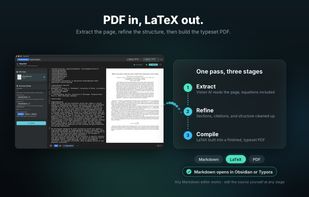
Drop in a PDF and convert entire pages in one pass. GhostTeX keeps the structure it finds — title, authors, affiliations, abstract, sections, equations, tables, references — and writes it out as LaTeX with equation numbering and \label generation, or as clean Markdown if you'd rather stay in a note-taking tool.
Equation Capture
Open any PDF, drag a rectangle around one equation, and get the LaTeX for that equation alone. Capture as many as you need from the same document; each one is appended to the panel, so you can work through a paper and copy the whole set out at the end. Dropped PNG and JPEG images work the same way.
Handwriting
The same capture panel reads hand-drawn equations. Sketch it on a tablet, snap the whiteboard, scan the back of an envelope — if you can read it, there's a good chance GhostTeX can too.
Nothing leaves your Mac
GhostTeX runs Qwen3-VL locally on Apple Silicon. There is no server, no API key, and no account. After a one-time model download the app works with the network off entirely.
This matters more for research than for most software. Unpublished manuscripts, work under embargo, confidential review copies, and industry-funded results are all documents you should not be pasting into a web service — and with GhostTeX the question never comes up, because the file never moves.
Fix it in place
Vision models misread things: a subscript becomes a superscript, a bracket closes in the wrong spot. GhostTeX has a chat that reads your document and edits the source directly rather than handing back a copy to paste. Ask it to correct a formula, rename a symbol, or restructure the front matter, and apply the change with one click.
You can also just edit the LaTeX yourself. It's your file, in a normal editor, at every stage.
Compile without leaving
An embedded TeX engine builds the finished PDF in the app, so the loop from scanned page to typeset document closes in one window. No round trip to a separate installation to find out whether it compiles.
Requirements
macOS on Apple Silicon. One-time model download; no account, no subscription to a server, no internet needed afterward. 9.99$ per year.







 lingyunzheng added GhostTex as alternative to Mathpix Snip
 lingyunzheng added GhostTex as alternative to Offline OCR


No comments or reviews, maybe you want to be first?