
GameDeck icon
GameDeck icon

GameDeck

 Like

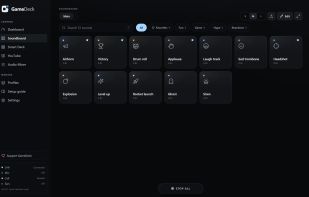
GameDeck turns any phone, tablet or second PC on your network into a control panel for your Windows PC. It runs next to the clock and serves a touch-friendly dashboard to any browser, so there is nothing to install on the phone.
GameDeck screenshot 1

Cost / License

Since

  • New

Platforms

  • Windows
  • Android
  • iPhone
0likes
0articles
Save

Features

Properties

Features

Highlights All activities

GameDeck News & Activities

Recent activities

GameDeck information

AlternativeTo Category

Audio & Music

GitHub repository

  •  0 Stars
  •  0 Forks
  •  0 Open Issues
  •   Updated  
View on GitHub
GameDeck was added to AlternativeTo by lehel on and this page was last updated .

No comments or reviews, maybe you want to be first?

Official Links

What is GameDeck?

GameDeck turns any phone, tablet or second PC on your network into a control panel for your Windows PC. It runs next to the clock and serves a touch-friendly dashboard to any browser, so there is nothing to install on the phone.

Features:

  • Soundboard that plays into Discord through a virtual cable (VB-CABLE), while you hear the sounds in your headphones
  • Smart Deck: buttons that open programs and links, press shortcuts and media keys, run multi-step macros, and show, minimize or close windows
  • Live hardware readouts on buttons: GPU temperature, CPU, RAM and VRAM
  • Audio scenes that save per-app volumes and switch automatically when a game comes to the front
  • YouTube control from the phone through a small Chrome/Edge extension: search, pick, skip, volume
  • Built-in setup guide that checks your audio routing live
  • 8 languages and one-click updates

GameDeck works only on your local network, pairs each device with a code shown on the PC, and has no account, no ads and no telemetry. It is free and open source under the GPL-3.0 license.