
FrontBack Scanner icon

FrontBack Scanner

 1 like

Free Mac and Windows app that scans multiple photos at once on a flatbed. Each print is saved as its own file: cropped, straightened, turned right-side up and named, with its back paired to its front. No account, no cloud.
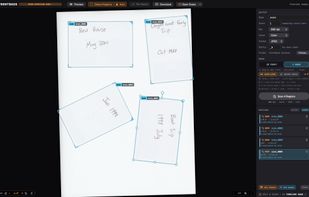
Back mode: flip the pile and each handwritten back is matched to its front

Cost / License

  • Free
  • Proprietary

Application type

Since

  • Since 2026

Platforms

  • Windows  Windows 10 (version 1809) or later, 64-bit
  • Mac  macOS 14 (Sonoma) or later, Apple silicon or Intel
1like
0articles
Save

Features

Features

Highlights All activities

FrontBack Scanner News & Activities

Recent activities

FrontBack Scanner information

FrontBack Scanner was added to AlternativeTo by Spencer Baker on and this page was last updated .

No comments or reviews, maybe you want to be first?

Official Links

What is FrontBack Scanner?

FrontBack Scanner by Timeline Scan is a free Mac and Windows app that scans several photos at once on a flatbed, saves each as its own upright file, and pairs each photo's back with its front.

Digitizing a shoebox one photo at a time is why it never gets done. Lay a handful of prints on the glass and scan once. FrontBack finds every print, crops and straightens it, turns it right-side up and names it. Then flip the pile and scan again: each back is saved beside its front (scan_0001.jpg and scan_0001_b.jpg), and it finds the handwriting even on an otherwise blank back.

It also stitches prints bigger than the glass (panoramas, album pages) from overlapping passes, and splits photos out of flatbed scans you already have, a whole folder at a time, with no scanner attached.

It works with the scanner you already own. On a Mac: Wi-Fi and network scanners that support AirScan/eSCL, and any USB flatbed with an Image Capture driver. On Windows: any scanner with a WIA driver. The Windows version does everything the Mac version does.

Free forever: no account, no upload, no watermark, no photo limit. Made by Timeline Scan, which puts your scans in date order when you are done.

Mac: macOS 14 (Sonoma) or later, Apple silicon or Intel. Also free on the Mac App Store. Windows: Windows 10 (version 1809) or later, and Windows 11, 64-bit.

FrontBack Scanner Videos