FontCrafter is a browser-based utility that converts a scan of your handwriting into a fully compliant OpenType font. You print a template, write out your characters, upload the image, and the app vectorizes your ink into an installable typeface.
Unlike many font-generation tools, the entire image processing and font compilation pipeline runs locally on your device via JavaScript. Your handwriting is never uploaded to a server. It requires no account, leaves no watermarks, and hides zero features behind a paywall.
Key Features:
Strict Privacy: 100% client-side processing. No server dependencies or data collection.
Multiple Export Formats: Generates OTF (best for desktop apps), TTF (universal compatibility), WOFF2 (optimized for web), and Base64 (direct CSS embedding).
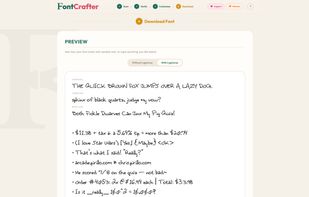
Contextual Alternates: Stores up to three variants of each character and cycles through them as you type, preventing repeated letters from looking identical and robotic.
Ligature Generation: Automatically composites and connects common letter pairs (like ff, fi, th, st) to mimic natural handwriting flow.
Extended Character Sets: Programmatically builds over 500 glyphs, including European accents, fractions, and smart quotes, by compositing your base strokes.
Color Fonts (COLR/CPAL): Allows you to bake drop shadows, organic ink textures, and duo-tone styles directly into the font binary for multi-layer rendering.
Built-in Fine-Tuning: Includes WYSIWYG tools to clean up stray marks, adjust baseline positioning, alter kerning pairs, and tweak individual letter sizing before export.







 Maoholguin added FontCrafter as alternative to TypedHand
 Maoholguin added FontCrafter as alternative to Coki Fonts
 chrispirillo added FontCrafter as alternative to Calligraphr, Glyphr Studio, FontCreator and iFontMaker

 Chris Pirillo

No comments or reviews, maybe you want to be first?