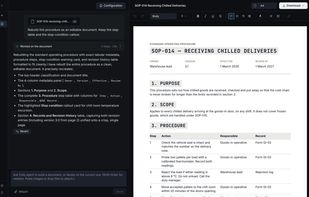
Foliq is an AI document writer that runs in your browser. You say what you need, for example a science worksheet, a sop document, or whatever type of document you are trying to build and the AI agent writes a finished document. It builds real headings, tables, lists and sign-off sections. You don't get a block of plain text to fix up yourself.
You can also start from a document you already have. Upload a PDF or a Word file, or paste a screenshot or a photo of a page. Foliq rebuilds it as a new document you can edit, with tables kept as tables. It doesn't just copy the text out. This helps when you need to update last year's proposal, a form or a set of study notes without typing it all again.
The document stays open after the AI is done. You can edit it yourself in the visual editor, or ask the agent for more changes in plain English, like "make the fees a table" or "add an answer key". The agent tells you which part of the page it changed.
When you're ready, download it as a Word (.docx) or PDF file. Both files look the same as the document in the editor.
Main features:
- Write new documents from a short description
- Rebuild uploaded PDFs, Word files, screenshots and photos as editable documents
- Visual editor, plus an AI chat that keeps working on the same document
- Export to Word and PDF with the same layout in both
- Works in the browser, nothing to install
- Free to start with no account; paid plans add downloads and more AI use
Common uses: worksheets and study materials, risk assessments, SOPs, proposals, reports and forms.








No comments or reviews, maybe you want to be first?