


Flowrigami
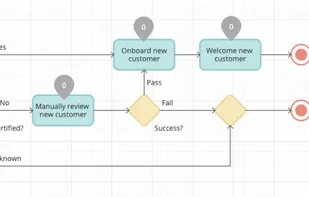
Flowrigami is a free and open-source workflow editor, designed to visualize diverse workflows and configure them using graphic components. It works in two modes: View Mode and Edit Mode. A workflow consists of several nodes and connectors.
Cost / License
- Free
- Open Source
Platforms
- Online

Features
Tags
Flowrigami News & Activities
Recent activities
Flowrigami information
Developed by
 SCAND
SCAND Licensing
Open Source and Free product.Alternatives
1 alternatives listedSupported Languages
- English

What is Flowrigami?
Flowrigami is a free and open-source workflow editor, designed to visualize diverse workflows and configure them using graphic components. It works in two modes: View Mode and Edit Mode. A workflow consists of several nodes and connectors. Properties of nodes and connectors are defined by the user. View Mode has: Central working area, displaying the workflow itself and enabling users interaction with it. Right area, displaying the properties of the selected node or connector. Edit Mode has: Left area with nodes and connectors library, allowing users to add new elements by dragging them from the library to central working area. This library can be customized by the user. The library contains different sets of objects defined for various diagram types (UML, BPMN, flowchart, etc.) Central working area displaying the workflow itself and enabling users interaction with it. Right area, displaying the properties of the selected node or connector and allowing a user to change these properties. Properties contain both visual ones and custom business properties defined by the user. Flowrigami is configured for different diagram types: flowchart, BPMN, UML etc. As component has both data format and settings format, the user can customize settings for his component online.