FloSync is free digital signage and video wall software for Windows and macOS. It plays video, images, and web pages in sync across multiple screens, whether those screens are attached to one computer or spread across many computers on the same network. It is used for digital signage, video walls, museums and exhibits, trade shows, showrooms, presentations, and live events.
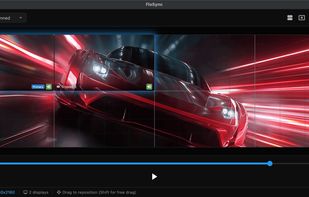
Screens can run in one of three modes: Independent, with different content on every screen; Mirrored, with the same content everywhere; or Spanned, with a single image or video stretched across several screens to form a video wall. A visual canvas editor lets you position screens by dragging them into place instead of calculating pixel offsets by hand, including across multiple machines. There are no per-screen licenses and no device limits.
Content is not limited to video. FloSync plays MP4, MOV, MKV, AVI, and WebM, including H.264, H.265, ProRes, and 4K, with hardware-accelerated decoding where the system supports it. It also displays still images and animated GIFs, live web pages, dashboards, and local HTML files, so a screen running a menu board can sit alongside a screen running a live web dashboard in the same scene.
Built-in scheduling handles installations that run themselves. Time-of-day mode changes content automatically through the day, with a different schedule for each day of the week, and interval mode cycles through scenes on a timer or on demand. FloSync can launch at login and go live on its own, which is what makes it practical for signage that runs unattended for days at a time.
For live and pro AV work, FloSync includes a composer view with live video previews, one-click Go Live to take every screen fullscreen at once, a controller mode for driving a show from a single machine, and MIDI controller support with MIDI Learn mapping and LED feedback on supported hardware.
The desktop application is free to download and use, with no subscription, no account, no activation, and no serial numbers. Optional cloud management features for organizations running deployed systems are in development, but the application itself does not depend on them.
FloSync is the successor to ArraySync, first released in 2009 and developed on and off ever since. FloSync is a complete rebuild rather than an update, and it remains in active development.







 Sean-Shachar-Levy added FloSync as alternative to DigitalSignage.com
 dpaanlka added FloSync as alternative to Xibo, Yodeck, ScreenCloud, Screenly and 2 more

 Tentekio


No comments or reviews, maybe you want to be first?