Floating Dock - Taskbar icon

Floating Dock - Taskbar

 Like

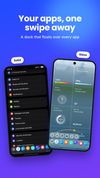
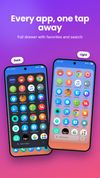
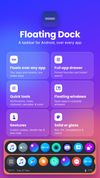
Floating Dock adds a desktop-style taskbar to any Android phone or tablet. Your pinned apps, an app drawer, quick controls and handy panels float above every app, one gesture away.
Floating Dock - Taskbar screenshot 1
Floating Dock - Taskbar screenshot 2
+3
Floating Dock - Taskbar screenshot 3

Cost / License

  • Pay once
  • Proprietary

Since

  • Since 2026

Platforms

  • Android
  • Android Tablet
Alternatives
0likes
0alternatives
0articles
Save

Features

Properties

Features

Highlights All activities

Floating Dock - Taskbar News & Activities

Recent activities

Floating Dock - Taskbar information

Floating Dock - Taskbar was added to AlternativeTo by GabrielDja on and this page was last updated .

No comments or reviews, maybe you want to be first?

What is Floating Dock - Taskbar?

DOCK

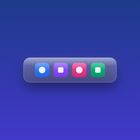
  • Pinned apps in a floating dock with the time, date and battery level
  • Pin Dock keeps it on screen, or let it hide until you call it
  • Adjustable height, icon size and spacing, corner radius and edge padding
  • Hides automatically in fullscreen apps, in landscape, under the keyboard and the notification shade, and can hide on the lock screen

TRIGGER PILL

  • A small pill at the bottom or on the left, right or both edges of the screen
  • Choose an action for Double-Tap, Swipe Up, Swipe Down and Swipe In: show the dock, App Menu, app search, notifications, quick settings, power menu, screenshot, flashlight or lock screen
  • Hold and Drag on the pill to change brightness or volume
  • Side pills don't trigger the Back gesture
  • Adjustable size, opacity, position and color

APP MENU & SEARCH

  • App drawer above the dock with a row of recent apps
  • Sort by name, install date or most used; hide apps you don't need
  • Fast search with typo-tolerant matching
  • Long-press any app to pin it, hide it or open it in a floating window

FLOATING WINDOWS

  • Open apps in resizable floating windows from the long-press menu, or make every tap open one
  • Remembers each app's window size and position
  • Works on devices with built-in floating window support; other devices need the free Shizuku app

QUICK CONTROLS

  • A panel of controls that opens from the pill above the dock
  • Flashlight, ringer mode, auto-rotate, brightness, volume, Do Not Disturb, Wi-Fi, Bluetooth, screenshot, lock screen, power menu, QR scanner, caffeine (keep screen on), share, calculator, clipboard, notes and notification history
  • Reorder them or turn off the ones you don't use

PANELS

  • Music: album art and playback controls for whatever is playing
  • Clipboard: save text, links, images and files from the share sheet, and mark favorites
  • Notes & To-dos: quick notes and checklists
  • Notification History: recent notifications grouped by app
  • Calculator, Volume (per stream) and Brightness panels

DESIGN

  • Material You dynamic colors, Light / Dark / System theme
  • Glass mode with real background blur (including Samsung frosted glass), transparency, tint and grain
  • Color tint presets for the dock and panels
  • Icon packs and icon shapes (square, squircle, circle)

MORE

  • Backup and restore all your settings
  • Starts automatically after reboot
  • Haptic feedback
  • Available in 17 languages