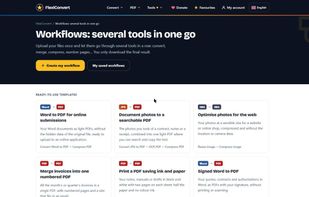
FlexiConvert lets you build workflows for everyday file tasks. Instead of running one tool at a time, you chain up to 10 steps and run them on up to 20 files at once: upload once, download only the final result.
For example: turn photos of a contract into one searchable PDF (JPG to PDF → OCR → compress), prepare photos for a website (resize → compress), or merge a month of invoices into one PDF with page numbers. Six ready-made templates are included; you can customise them or start from scratch, and the builder only offers tools that accept what the previous step produces.
Workflows work without an account. A free account lets you save them and run them again from any device; it stores only the steps, never the files. Uploaded files are deleted from the servers within an hour, and hidden metadata such as GPS location or author is removed by default.
Every step is also available as a standalone tool: image conversion (HEIC, WebP, AVIF, RAW…), PDF merge, split, compress, OCR, edit and sign in the browser, PDF to Word, Excel or PowerPoint, Word to PDF, video and audio conversion, and background removal. The interface is available in 24 languages, including English.







 Samuel-7194 added FlexiConvert as alternative to Sejda, Convertio, FreeConvert, Smallpdf and 5 more


No comments or reviews, maybe you want to be first?