FlashGet Kids icon
FlashGet Kids icon

FlashGet Kids

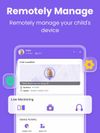
FlashGet Kids is a parental control app designed to help parents manage their child's device use, stay informed about their digital activities, and support a safer online environment.
FlashGet Kids screenshot 1
FlashGet Kids screenshot 2
+9
FlashGet Kids screenshot 3

Cost / License

  • Freemium (Subscription)
  • Proprietary

Platforms

  • Android
  • iPhone
  • Android Tablet
  • iPad

Features

Properties

  1.  Privacy focused
  2.  Distraction-free

Features

  1.  Real time collaboration
  2.  Ad-free
  3.  No Coding Required
  4.  Parental Control

FlashGet Kids News & Activities

Highlights All activities

Recent activities

  • Bark icon
    Mattx added FlashGet Kids as alternative to Bark
  • OurPact icon
    Mattx added FlashGet Kids as alternative to OurPact
  • ryanfindstool reviewed FlashGet Kids  

    I wasn't sure if I really needed a parental controls app at first, but I decided to give FlashGet Kids a try. I took a little time to get everything set up, but after that I found my self using it regularly. I mostly check screen time and app usage, especially when I feel like my child spending too much time on the phone. I also like there are other features available if I need them. It's not perfect, but overall it has made managing device use a bit easier for me

  • Mattx liked FlashGet Kids
  • Mattx updated FlashGet Kids

FlashGet Kids information

  • Developed by

    HK flagHONGKONG FLASHGET NETWORK TECHNOLOGY CO., LIMITED
  • Licensing

    Proprietary and Freemium product.
  • Pricing

    Subscription ranging between $5 and $7 per month + free version with limited functionality.
  • Alternatives

    0 alternatives listed
  • Badge

    Get an embeddable badge for FlashGet Kids
  • Supported Languages

    • English
    • Arabic
    • Chinese
    • Croatian
    • Czech
    • French
    • German
    • Greek
    • Hindi
    • Hungarian
    • Indonesian
    • Italian
    • Japanese
    • Korean
    • Malay
    • Portuguese
    • Russian
    • Spanish
    • Swedish
    • Thai
    • Turkish

AlternativeTo Categories

Security & PrivacyHome & Family

Apple AppStore

  •   Updated 
  •   4.76 avg rating
View in AppStore

Our users have written 1 comments and reviews about FlashGet Kids, and it has gotten 1 likes

FlashGet Kids was added to AlternativeTo by Jackcer Chen on and this page was last updated .

Comments and Reviews

   
ryanfindstool
0

I wasn't sure if I really needed a parental controls app at first, but I decided to give FlashGet Kids a try. I took a little time to get everything set up, but after that I found my self using it regularly. I mostly check screen time and app usage, especially when I feel like my child spending too much time on the phone. I also like there are other features available if I need them. It's not perfect, but overall it has made managing device use a bit easier for me

Review from a new or low-activity account — shown here, but not counted in the app rating.

Official Links

What is FlashGet Kids?

FlashGet Kids is a parental control app designed to help parents manage their child's device use, stay informed about their online activities, and support their digital safety. With one parent account, you can use selected parental control features from an Android to an iPhone, including location tracking, screen time management, app controls, and activity-related notifications.

FlashGet Kids helps parents better understand how their children use their devices, encourage healthy digital habits, and stay aware of potential online safety concerns.

What can FlashGet Kids do?

FlashGet Kids provides a range of parental control tools to help parents manage and understand their child's device use.

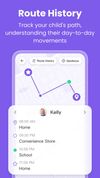
App Usage Management: Help parents understand how children use different apps and manage app access when needed. Real-Time Location Tracking: Allows parents to view their child's location and stay informed about their whereabouts. One-Way Audio: Helps parents better understand their child's surroundings when needed and provides additional support for child safety. Notification Sync: Allows parents to view supported app notifications and stay informed about potential concerns, such as cyberbullying, suspicious interactions, or online scams. Screen Time Management: Helps parents set screen time limits and schedules to encourage healthier device usage habits.

Key Features

Remote Camera – View the child's device camera remotely when needed. Screen Mirroring – View the child's device screen to better understand device activity. Real-Time Location Tracking – Check your child's current location and stay informed about their whereabouts. Screen Time and App Blocker – Set screen time limits, create schedules, and manage access to selected apps. Notifications and Alerts – View supported app notifications and receive alerts about potential concerns. App Usage Management – Understand how much time children spend on different apps and manage app usage. One-Way Audio – Listen to the surrounding environment when necessary to better understand a child's situation.

FlashGet Kids combines device management, screen time controls, location tracking, app management, and safety-related features in one parental control solution. It helps parents stay informed about their child's device use while supporting safer and healthier digital habits.

Activating FlashGet Kids is simple:

  1. Install FlashGet kids on your phone and child's version on your kids phone
  2. Connect to your child's device through an invitation link or code
  3. Link your account to your child's device

FlashGet Kids Videos