F
F
FineTerm
1 like
Connection manager and input enhancer for macOS terminal.
Cost / License
- Free
- Open Source (MIT)

Platforms
- Mac
- Terminal
Features
Properties
- Lightweight
- Privacy focused
Features
- Ad-free
- Dark Mode
- Works Offline
- No registration required
- No Tracking
- Command line interface
- Terminal-based
- Session Management
- Tui
FineTerm News & Activities
Highlights All activities
Recent activities
FineTerm information
No comments or reviews, maybe you want to be first?
What is FineTerm?
The missing Connection Manager and Input Enhancer for macOS Terminal.
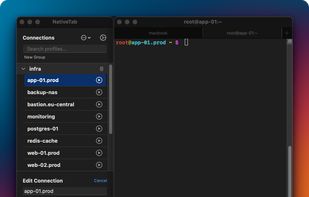
FineTerm is a lightweight, native Swift application designed to supercharge the stock macOS Terminal.app. It bridges the gap between the native terminal experience and the advanced session management features found in heavy third-party emulators like iTerm2 or SecureCRT.
It does not replace Terminal.app—it wraps it with a powerful session manager and injects nostalgic PuTTY-style "Pro" input behaviors that Unix and Windows admins have missed for years.
Key Features:
- Connection Manager
- Organized: Group your SSH, Telnet, or local script commands into foldable folders.
- Smart Search: Instant "Spotlight-style" search with multi-word matching (e.g., "db prod" finds "Production DB Server").
- Drag & Drop: Reorder connections and organize groups intuitively.
- Import/Export: Share your server lists via JSON.
- Terminal Tab Naming: Automatically sets the Terminal tab title to your connection name.
- "Pro" Input Interceptors
- Copy on Select: Simply dragging your mouse over text in the Terminal automatically copies it to the clipboard. No more Cmd+C.
- Paste on Right Click: Right-clicking anywhere in the Terminal window pastes your clipboard.
- Note: These features operate by intercepting mouse events specifically when Terminal is focused and injecting keystrokes.
- The "Focus Loop"
- Configurable Global Hotkey (Default: Cmd+N):
- From Terminal: Press the hotkey to instantly bring the Connection List to the front.
- System-wide Mode: Optionally enable global mode to activate FineTerm from any application.
- Second Activation: When FineTerm is already focused, pressing the hotkey again instantly switches back to Terminal—perfect for quick glances at your connection list.
- Select your server, hit Enter, and it launches a new tab in your existing Terminal window.


