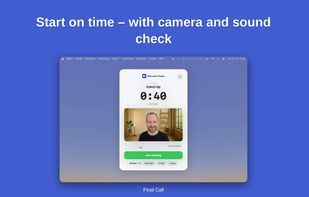
Final Call is a macOS menu bar app that makes sure you don't miss a meeting. Shortly before an event from your Apple Calendar starts, it shows a fullscreen notification with a live countdown. When the meeting begins, the notification turns red and shakes, so you notice it even when you're deep in focused work.
The notification includes a camera preview, a microphone level meter, one-click join (button or keyboard shortcut) and snooze (to the meeting start, +3 or +5 minutes). It stays on screen until you join, snooze or dismiss it.
Final Call detects meeting links automatically and supports 18 video conferencing apps, including Zoom, Microsoft Teams, Google Meet, Webex, Slack, FaceTime and Jitsi Meet. It can pause Apple Music or Spotify when you join a call. The app lives in the menu bar without a Dock icon and shows today's meetings with a progress ring during active calls.
Privacy: calendar data is read locally on your Mac and not sent to any server. Camera and microphone are only used for the preview in the notification and are never recorded.
Works with all calendars synced through the macOS Calendar app (iCloud, Google, Exchange and others). Available in English and German, supports Light and Dark Mode, requires macOS 13 or later. 14-day free trial, then a one-time Lifetime License or a monthly subscription with the same features.







 finalcalldev added Final Call as alternative to In Your Face

No comments or reviews, maybe you want to be first?