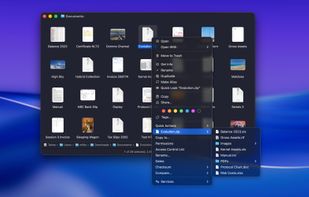
FileUtils extends macOS Finder with powerful file operations that macOS doesn't provide out of the box, accessible directly from Finder's contextual right-click menu (and/or toolbar item menu), without ever opening Terminal.
If you work seriously with files on your Mac - managing POSIX permissions and Access Control Lists, renaming in bulk, comparing and synchronizing folders, verifying checksums, executing custom script actions… - FileUtils puts all of that one right-click away, integrated seamlessly into the Finder you already use.
All menu items are fully customizable: choose which operations appear in menus, arrange them in root menu or submenus however you like. All operations are also available in Finder "Services" menu, with items' keyboard shortcuts assignable in System Settings/Preferences. That way you can access any FileUtils operation with keyboard via a custom assigned keyboard shortcut, all while browsing your files in Finder.
Operations currently available in FileUtils:
• Full POSIX file permissions, including SetUID, SetGID and Sticky bits and propagation of permissions down the folder hierarchy
• Access Control List, for even finer file access control and permissions
• Show effective file access for every user in the system
• Modify file's dates and times (creation, modification, last access, added to folder) by modifying date/time components or timestamps
• Toggle most common file flags (locked, hidden, file extension hidden, stationery pad, custom icon, Time Machine backup exclusion)
• Multiple files batch rename with powerful and flexible renaming options
• Size browser, hierarchically showing files based on their sizes, in the columns and graph view
• Compare and synchronize two folders with powerful, yet simple and intuitive folder comparator
• Compare files and folders using comparison application of your choice
• Execute your own custom scripts, which selected files as input arguments and see eventual results as a textual output. FileUtils can execute UNIX scripts/binaries, AppleScript scripts and Automator workflows
• Calculate file checksums, most common hash types available (MD2, MD4, MD5, SHA-1, SHA-256 variants…)
• Copy and move files from Finder contextual and toolbar item action menu
• Delete files bypassing the Trash, using normal deletion or three standard deletion security methods
• Archive files and expand archives, common archive types and compression methods are supported
• Browse archives and expand only specific file/folder through hierarchical contextual and toolbar action menus in Finder
• Create new "empty" files. Many file types are supported out-of-the-box, a user can add custom file types as well. Availability of some file types depends on installed applications
• Create (absolute) symbolic link to files
• Copy file full path and name in various ways, as URL, UNIX, HFS, Terminal, Windows…
A 30-day free trial is available on the website.






 Paul added FileUtils as alternative to Shell, FileMenu Tools, Easy Context Menu, SwiftyMenu and 23 more


No comments or reviews, maybe you want to be first?