

FamilyProtect
FamilyProtect is parental control software for Windows PCs. It filters web content at the DNS layer rather than through a browser extension or a single browser's settings, so one policy covers Chrome, Edge, Firefox, portable browsers run from a memory stick, game launchers...
Cost / License
- Subscription
- Proprietary
Application types
Platforms
- Windows
Features
Properties
- Privacy focused
Features
- Ad-free
- Porn filter
- Parental Control
- Web filter
- Dns
FamilyProtect News & Activities
Recent activities
- jamieede added FamilyProtect
jamieede added FamilyProtect as alternative to Qustodio Parental Control, Net Nanny and Microsoft Family Safety
FamilyProtect information
What is FamilyProtect?
FamilyProtect is parental control software for Windows PCs. It filters web content at the DNS layer rather than through a browser extension or a single browser's settings, so one policy covers Chrome, Edge, Firefox, portable browsers run from a memory stick, game launchers and any application that opens a web view.
The agent runs as a system service rather than inside the child's Windows account. A standard, non-administrator account has no setting to turn it off, and protection re-applies itself within minutes if it is removed or interfered with. Filtering is attached to the PC rather than to the home router, so it stays in effect on other networks, such as school Wi-Fi or a phone hotspot.
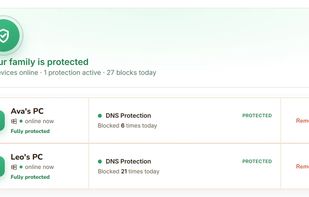
Filtering is category based and covers adult content, gambling, drugs, extremism, malware and unsafe downloads, deceptive advertising, hacking and cheating tools, and the proxy and VPN sites used to get around filters. Parents use a web dashboard that lists every family PC, whether each one is protected right now, and what was blocked on it, grouped by severity. A paid add-on exposes the individual domains, times and weekly trends.
FamilyProtect deliberately omits screen time limits, message reading, keystroke logging, location tracking and a full browsing history feed.
It supports Windows 10 and Windows 11 and has no mobile app. Pricing is a single subscription covering every Windows PC in a household, with a 14 day free trial.


