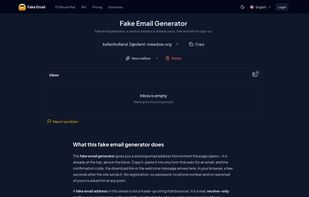
Fake Email gives you a working, receive-only email address as soon as the page opens, with no sign-up. The address looks like a person's (a first name and surname on one of the service's domains). Messages, attachments included, show up in the browser within seconds of being sent, with no reload. Each inbox can be seen only by the browser session or account that created it. Nothing is public, and nobody can open your inbox by typing your address.
By default a mailbox lasts 24 hours. A 10 Minute Mail mode deletes the address after ten minutes, and you can add ten more if a code is late. You can pick the domain yourself, which helps when a site blocks one domain. Signing in with Google is free. It lets you pick the name part of the address and keeps more mailboxes for longer. Mailboxes cannot send, reply or forward.
The Fake Email Generator extension for Chrome and other Chromium browsers puts the inbox in the toolbar. It adds a one-click autofill button to email fields on any site (you can turn it off per site) and shows unread mail as a badge on its icon. The extension and the site share the same account and mailboxes.
For developers there is a Public API for automated email tests. It is REST with a Bearer key, has an OpenAPI 3 spec, and every free account can create a key. Official SDKs for JavaScript/TypeScript (npm) and Python (PyPI) wait for the message and read the one-time code or link for you. The docs include an email testing guide for Playwright, Cypress and Selenium.
Plans: Anonymous (no account; 2 active mailboxes, 24 h retention), Authorized (free with Google sign-in; 3 mailboxes, 7 days, custom address, 20 API mailboxes a month) and PRO (10 mailboxes, 30 days, 500 MB, premium domains, 300+ API mailboxes a month). PRO is free while the open beta runs. The site is available in 8 languages.







 Danil-Suyagin added Fake Email as alternative to Mailinator, 10 Minute Mail, Guerrilla Mail, MailDrop and 8 more


No comments or reviews, maybe you want to be first?