

EyeCanSee icon
EyeCanSee icon

EyeCanSee

 1 like

EyeCanSee is a viewer and manager for photos, videos, 3D models and CAD drawings, for Linux and Windows: browse, convert, find duplicates, annotate images and cover private data, and open folders, disks, servers and Android phones the same way.
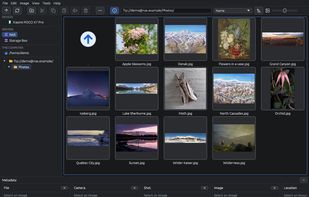
Folders, two servers and a phone in the left panel, with a folder of an FTP server open in the grid

Cost / License

Application type

Since

  • New

Updated

  • Updated Nov 2026

Platforms

  • Windows  Also available as an installer and a portable zip from GitHub Releases.
  • Linux  Flatpak, Fedora COPR and AppImage.
  • Fedora  Fedora COPR repository.
  • Flatpak  From the developer's own signed Flatpak repository, not from Flathub.
  • AppImage  Portable: download it from GitHub Releases and run it, nothing to install.
1like
0articles
Save

Features

Properties

Features

Highlights All activities

EyeCanSee News & Activities

Recent activities

EyeCanSee information

AlternativeTo Categories

Photos & Graphics, Video & Movies

GitHub repository

  •  7 Stars
  •  0 Forks
  •  47 Open Issues
  •   Updated  
View on GitHub
EyeCanSee was added to AlternativeTo by Pierluigi Montinaro on and this page was last updated .

No comments or reviews, maybe you want to be first?

Official Links

What is EyeCanSee?

EyeCanSee is a viewer and manager for photos, videos, 3D models and CAD drawings, for Linux and Windows: browse, convert, find duplicates, annotate images and cover private data, and open folders, disks, servers and Android phones the same way. One program instead of three: a viewer, a small image editor and simple video tools.

There is no import and no database: you open a folder and the photos are there, with cached thumbnails and a viewer that preloads the next image. It opens modern and camera formats such as HEIC, AVIF, JPEG XL, Camera RAW and PSD, plays videos and audio files, shows 3D models (STL, OBJ, glTF, FBX, STEP and others) with their colours and textures, and CAD drawings (DWG, DXF) with their layers and dimensions.

Files are copied and moved from one device to another, renamed and deleted, with a trash on every device. Images and videos are converted and resized one at a time or many at once, videos on the graphics card when it can, and the metadata go into the new file. The built-in image editor adds arrows, shapes, text, speech bubbles, numbered steps and stamps, crops and rotates, and covers private data with solid boxes that leave nothing of what they hide in the file. Duplicate photos, videos and audio files are found in a folder and its subfolders, always keeping at least one copy.

SFTP, FTP and FTPS servers are browsed like any folder. The interface is in English and Italian, with a light and a dark theme and a built-in manual. Releases are signed, and EyeCanSee collects no data.

EyeCanSee is written by one developer with the help of Claude Code, and every feature is tested on real computers and devices before it goes in.