ExplainThisDoc helps you collect, find and understand personal paperwork on iPhone and iPad. Scan letters or import PDFs, images and other supported files into one digital archive. Capture a document, get on with your day and find it again when you need it, without maintaining a folder system or manually tagging every file.
Bring together documents scattered across paper piles, email attachments, downloads and phone photos. Review multi-page scans, add or rescan pages, and import content from Files, Mail, other apps or the clipboard. Text recognition runs directly on your device.
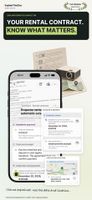
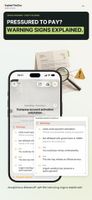
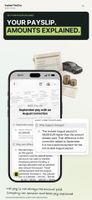
Choose how much assistance you want. Scan Only lets you digitize and archive without AI. Free on-device analysis provides summaries, key information and automatic categorization using Apple Intelligence on supported devices and in supported languages. Optional Pro analysis provides more detailed explanations of complicated letters, contracts, medical reports and bills. Depending on the document, it can explain conditions, highlight obligations and potential risks, and identify deadlines, amounts, tasks and possible next steps.
The explanation stays connected to the original. Check the exact wording whenever you need to. Use recognized information to create calendar entries, open addresses for navigation or find contact details for follow-up questions.
The built-in reader lets you search recognized text, highlight passages, add comments and draw signatures. Check and correct recognized text against the original and share the corrected text, including after archiving. Keep personal notes with your documents and link related items, such as a contract and invoice, a notice and reply, or a booking and ticket.
Search your archive using titles and recognized information, and filter by document type and date. Optional iCloud sync keeps your collection available across your own devices. Face ID protects access, while archive export and import support backup and transfer.







 EU
EU
 Julian-Heger added ExplainThisDoc as alternative to fileee, FairScan, Paperless-ngx, OSS Document Scanner and 27 more
 Julian Heger


No comments or reviews, maybe you want to be first?