veryPage is privacy-first PDF sharing with page-by-page reader analytics. Upload a PDF, share a link, and the link reports back: who opened it, how long they spent on each page, how far they got, and whether they came back.
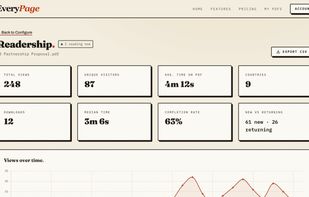
Most file tools stop at a view counter. EveryPage times the reading. The centrepiece is the read-through funnel, the percentage of readers who reached each page, alongside breakdowns by source, referrer, device, browser, and country, a live "reading now" indicator, read receipts, optional email notifications, and CSV export. Folders roll analytics up across a set of documents, and a GA4 integration sends reading events to your own Google Analytics.
Privacy is built in rather than bolted on. Visitor IP addresses are never stored: each reader becomes a stable pseudonym such as "Reader #214" via salted hashing, with country resolved in-flight before the address is discarded. Files are encrypted at rest with AES-256, viewing is cookieless with no consent banner, and the service is operated from the United Kingdom.
Four viewer modes (Standard, Flipbook, Swipe, and Magazine) all render in-app, so readership works in every one. The flipbook is a drag-to-turn 3D book that carries your background, logo, and page effects, and can be embedded anywhere. Word and PowerPoint files are converted to PDF on upload, and there is a DocSend-to-PDF converter.
Access controls cover password protection, expiry dates or never-expiring links, per-file download toggles, an email gate that puts names on the readership register, custom lead-capture forms, per-viewer watermarking, self-destructing links, and per-recipient links you can revoke individually. Pro adds reader identities, custom domains, interactive hotspots, reader comments, photo proofing, annotations, dynamic links, and invites with distribution lists.
EveryPage connects to the tools you already use: Zapier, Make, n8n, Notion embeds, a WordPress plugin, a Chrome and Edge browser extension, a Canva app, Close CRM, webhooks and Slack notifications, a REST API, and an MCP server for AI assistants.
Pricing is flat per account, not per user: Free (up to 3 PDFs, 20MB per file), Basic at $9/month (up to 100 PDFs, 200MB per file), and Pro at $29/month (unlimited PDFs, 2GB per file). Annual billing gives two months free. No card is required to start.







 nickpears added EveryPage as alternative to Papermark, Qwilr, DottedSign, VaultSage.ai and 41 more
 EveryPage

No comments or reviews, maybe you want to be first?