ESPKVM icon
ESPKVM icon

ESPKVM

Open-source IP-KVM firmware for ESP32-P4 boards: another computer's screen, keyboard and mouse in your browser, from the BIOS up, with no Linux inside.
Main ui

Cost / License

Platforms

  • Windows
  • Mac
  • Linux
  • Self-Hosted
1like
0articles
Save

Features

Properties

  1.  Lightweight

Features

  1.  User Session Recording
  2.  Desktop Sharing
  3.  Screen Sharing
  4.  No registration required
  5.  Ad-free
  6.  Dark Mode
  7.  Wake on LAN
  8.  Unattended Access
  9.  KVM over IP

ESPKVM News & Activities

Highlights All activities

Recent activities

ESPKVM information

AlternativeTo Categories

Remote Work & Education, Network & Admin, OS & Utilities

GitHub repository

  •  490 Stars
  •  38 Forks
  •  2 Open Issues
  •   Updated  
View on GitHub

Popular alternatives

View all
ESPKVM was added to AlternativeTo by Evgenij Spitsyn on and this page was last updated .

No comments or reviews, maybe you want to be first?

Official Links

What is ESPKVM?

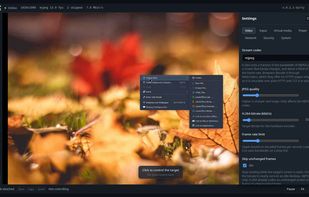
ESP-KVM turns an ESP32-P4 board and an HDMI capture board into an IP-KVM: another computer's screen, keyboard and mouse in your browser. Nothing is installed on that computer, so it works where remote desktop cannot - in the BIOS, at a boot menu, on a machine that will not start or has no OS.

It is not a small Linux computer but one firmware image on a microcontroller: nothing to maintain, nothing for a power cut to corrupt, no shell or SSH to secure, and a failed update rolls itself back. The trade-off is about 20-24 fps at 1080p rather than 60.

It runs on fifteen ESP32-P4 boards from Waveshare, Espressif, M5Stack, DFRobot, Guition and VIEWE, and is flashed from the browser. Live demo: https://demo.espkvm.io

Video and control

  • HDMI capture up to 1080p, MJPEG or hardware H.264
  • USB keyboard, absolute and relative mouse, media keys
  • Paste text as keystrokes in five keyboard layouts
  • Wake-on-LAN and ATX power control
  • Several viewers, one in control at a time
  • Phone and tablet: touch trackpad, on-screen keyboard, installs as an app

Virtual media

  • Boot from a disk image on a microSD card (FAT32 or exFAT)
  • A real DVD drive, images over 4 GB
  • A rescue image in the device's own flash

Reading the screen

  • Reads BIOS and console screens as text you can copy
  • Text instead of video on a slow link
  • Watches for phrases, notices a stop screen or a blank one

Recording

  • Recordings and screenshots on the microSD card
  • A dashcam: keeps the last minutes and saves an MP4 on a stop screen, a watched phrase or a power cut, and can send it to Telegram
  • Timelapse, and search a recording by the text on screen

Automation

  • Key macros, and runbooks that wait for words on the screen (DuckyScript accepted)
  • A cron scheduler
  • Notifications to Telegram or a webhook
  • A REST API for scripts and AI agents

Network and access

  • Ethernet, PoE and Wi-Fi on the boards that have them, with a setup hotspot
  • Native Tailscale (or Headscale) and WireGuard in the firmware: no port forward, no vendor cloud
  • HTTPS with its own certificate or yours, login, physical password reset

Integrations and upkeep

  • Home Assistant over MQTT: sensors, power buttons, a camera, runbooks as buttons
  • Network updates with automatic rollback, any release installable
  • Settings backup, diagnostics, an optional small status screen

Free and open source (Apache-2.0). No account, cloud or subscription.

ESPKVM Videos

Show 2 more videos