


Email Extractor - Website Email Finder
1 like
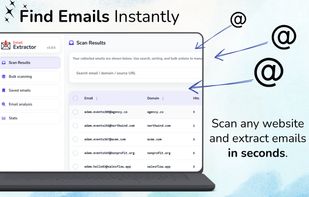
Email Extractor is a browser extension that finds publicly visible email addresses on the websites you visit. It can scan the full page HTML or visible text, remove duplicates, identify common patterns, and organize the results in a clean dashboard.

Cost / License
- Freemium (Pay once or Subscription)
- Proprietary
Application typeApplication types
 EU
EUPlatforms
- Microsoft Edge
- Google Chrome
- Opera
- Brave
- Mozilla Firefox


Features
Email Extractor - Website Email Finder News & Activities
Highlights All activities
Recent activities
 PG_Builds added Email Extractor - Website Email Finder as alternative to Fast Mail Finder, MailHarvest Pro and Email Extractor: Export Email & Leads
- PG_Builds liked Email Extractor - Website Email Finder
- PG_Builds updated Email Extractor - Website Email Finder
- PG_Builds updated Email Extractor - Website Email Finder
 PG_Builds added Email Extractor - Website Email Finder as alternative to MailDump and Email Hunter
 HermannAntonov added Email Extractor - Website Email Finder as alternative to Email Scraper


Email Extractor - Website Email Finder information
Developed by
 ExtensioHub
 Licensing
Proprietary and Freemium product.Pricing
One time purchase that costs $69, and / or subscription ranging between $4 and $5 per month + free version with limited functionality.Alternatives
12 alternatives listedBadge
Get an embeddable badge for Email Extractor - Website Email FinderSupported Languages


No comments or reviews, maybe you want to be first?