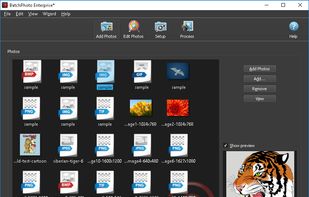
A powerful photo manipulation program for Windows and Mac that makes it easy to add date/time stamps, resize, convert, watermark, touch-up, apply special effects, and rename hundreds of photos in a single operation!.

EdiKer is described as 'Bulk Resize, Crop, Watermark, Compress multiple images at once!' and is an app. There are more than 10 alternatives to EdiKer for a variety of platforms, including Windows, Mac, Web-based, Linux and Self-Hosted apps. The best EdiKer alternative is XnConvert. It's not free, so if you're looking for a free alternative, you could try XnConvert or ReaConverter. Other great apps like EdiKer are Graphic Converter, GraphicConverter, ImBatch and Online Image Converter.
A powerful photo manipulation program for Windows and Mac that makes it easy to add date/time stamps, resize, convert, watermark, touch-up, apply special effects, and rename hundreds of photos in a single operation!.

Pixle controlled conversions is a free easy-to-use URL system developed for those who need to convert a variety of files via URL command line. Simply pass in the URL of any image file with the correct parameters to convert your jpg, png, gif, or webp image and it will download...

Pixle is the most popular SaaS alternative to EdiKer.
Batch PNG to JPG is a handy png to jpg converter. For you who need to do a batch image conversion from png picture to jpg image. It will flatten multilayer png and for multi frame png it will convert the first frame only.


Photopus Pro is an easy to use batch image processing to simplify the process to convert, add watermarks (text and image), resize, transform, touch-up, rename, and apply effects to your digital images.


SysTools Image converter software enables you to export multiple images to the desired file format. Using this tool user convert images to PDF, DOC, DOCX, HTML. The best part of this software is that it is capable enough to convert multiple images.

Moo0 Image Converter let you easily convert image files into different format.
It's very easy to use and you just need to drag & drop files onto the program window. It currently supports jpg, gif, png, bmp and icon format. Yes, you can create even icon files only by drop.


Batch PSD to JPG is a free batch Adobe Photoshop PSD image to JPG image converter. A design tool for converting psd design or flatten multi layer psd design to jpg images with quality that you can set based on your preferences an requirements.