
Echo for Mac icon
Echo for Mac icon

Echo for Mac

Private Mac player resumes songs, podcasts, and videos from Spotify, YouTube, Apple Music, podcasts, and browser tabs, keeping a single history, bookmarks, and floating overlay. All data stays on-device with no account or cloud needed, license includes updates.
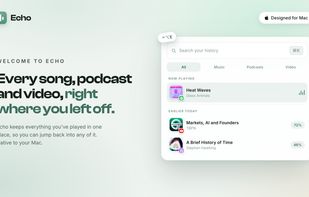
Echo for Mac screenshot 1

Cost / License

  • Pay once
  • Proprietary

Application type

Platforms

  • Mac
0likes
0comments
0articles

Features

Properties

  1.  Support for Themes
  2.  Privacy focused
  3.  Lightweight

Features

  1.  Ad-free
  2.  Picture in Picture
  3.  No registration required
  4.  Dark Mode
  5.  Podcast Manager
  6.  Now Playing
  7.  AI-Powered
  8.  Podcast Player
  9.  Sits in the MenuBar

Echo for Mac News & Activities

Highlights All activities

Recent activities

Echo for Mac information

  • Developed by

    GB flagTHEODORE HQ
  • Licensing

    Proprietary and Commercial product.
  • Pricing

    One time purchase (perpetual license) that costs $10.
  • Alternatives

    22 alternatives listed
  • Supported Languages

    • English
Echo for Mac was added to AlternativeTo by THEODORE HQ on and this page was last updated . Echo for Mac is sometimes referred to as Echo
No comments or reviews, maybe you want to be first?

What is Echo for Mac?

Echo is your media memory for Mac. You play things all day: a track in Spotify, a YouTube video in a browser tab, a podcast in Apple Podcasts. Then you lose track of where they all were. Echo remembers every song, podcast and video you play, across your apps and your browser, and brings it back at the exact spot, with one shortcut sat inside a minimal player experience.

Everything in one place • Every source, one history - Spotify, Apple Music, YouTube, podcasts and any browser tab, gathered into one tidy history. • Back at the exact second - press the shortcut and Echo's player overlay appears, ready to resume the last thing you played, right where you left off. • Float any video - any video hovers over your work, then turns to glass so you can click straight through.

Look back • Your day in sound - see your day laid out as a waveform of everything you played. • Bookmark the bit that hit - mark the moments that land, and jump back to them whenever. • Finish what you started - your shelf keeps the things you meant to get back to, ready to pick up.

Made for your Mac • Coloured by what's playing - the overlay takes on the colour of whatever you're playing. • Pick it up on your phone - scan a code to carry on where you left off, away from your Mac. • Private by design - on-device, no account, no servers, zero data collection.

It's a one-time $9.99 (one licence covers three Macs, every future update included), with a 14-day money-back guarantee.

Official Links
