DVDFab DVD Copy icon

DVDFab DVD Copy

 3 likes

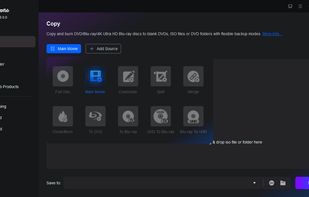
Efficient DVD copying tool that duplicates and backs up DVDs while neutralizing copy protection such as CSS and APS. Offers six modes and syncs metadata, saving outputs as ISO files or onto discs with high-speed processing via GPU acceleration.
DVDFab DVD Copy screenshot 1

Cost / License

  • Paid
  • Proprietary

Application type

Since

  • Since 2012

Platforms

  • Windows
  • Mac
3likes
0articles
Save

Features

No features, maybe you want to suggest one?

Highlights All activities

DVDFab DVD Copy News & Activities

Recent News

No news, maybe you know any news worth sharing?

Share a News Tip

Recent activities

No activities found.

DVDFab DVD Copy information

AlternativeTo Categories

CD/DVD Tools, Backup & Sync

Our users have written 1 comment or review about DVDFab DVD Copy, and it has gotten 3 likes.

DVDFab DVD Copy was added to AlternativeTo by Ola Johansson on and this page was last updated .

Comments and Reviews

   
Guest
0

A Great software for me!

Review from a new or low-activity account — shown here, but not counted in the app rating.

Official Links

Page may contain affiliate links. Affiliate links never affect ranking.

What is DVDFab DVD Copy?

DVDFab DVD Copy is a tool for duplicating DVDs, backing up content, and neutralizing copy protections such as CSS, APS, RC, DADC, etc. It can copy DVDs to an ISO file, blank discs, or a hard drive. It uses a Cloud Decryption Service to decrypt encrypted DVDs via a cloud server. The software can open DVDs in 5 to 10 seconds and can create lossless DVD-9 to DVD-9 or DVD-5 to DVD-5 backups. It can also compress a DVD-9 to a DVD-5.

The software allows DVDs to be copied to a blank DVD disc, saved as ISO image files or VIDEO_TS folders. It supports ImgBurn and DVDFab Burning Engine for copying and offers six copy modes: Full Disc, Main Movie, Clone/Burn, Merge, Split, and Customize.

DVDFab DVD Copy can copy multiple DVDs at a high speed using GPU Hardware Acceleration technology. It includes a Meta Info feature, syncing all metadata from the source with the server and generates a .nfo file for displaying metadata on media managers. For DVDs with Cinavia Watermark, it works with DVDFab DVD Cinavia Removal to remove Cinavia protection, preventing Cinavia Error Message Code 3.

DVDFab DVD Copy Videos