Drift is an ambient soundscape mixer for sleep and focus. Layer nature recordings and deep-space textures, set each to taste, and let the sleep timer fade things out. It keeps playing with the screen off, as a proper background media app should.
Drift is a native Android app — Kotlin, Jetpack Compose, and Media3. It was rebuilt from an earlier Capacitor/WebView version specifically to fix screen-off playback, which a WebView cannot do reliably.
Design
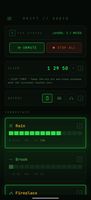
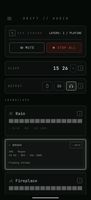
The interface borrows from cockpit instrument panels: phosphor green on near-black, a monospace face, segmented meters, and a status display for the mix and the sleep timer. Built for the hours when most things have gone quiet. State is never signalled by colour alone (border, text, and motion all carry it) so the UI stays legible for colourblind users.
Sounds
Recorded layers (shipping):
Rain, Brook, Fireplace, Wind, Thunder, Crickets, Thruster, Interstellar Plasma (Voyager 1), Mars Wind (InSight lander), Space Whale, Life Support.
Forest, Warp, and Radio Chatter were synthesised layers in an earlier version and are on hold until they either return as recordings or a synthesis engine lands. Full attribution is in CREDITS.md.
Features
Mix any number of recorded layers at independent volumes. Each sound remembers its last volume; dragging a volume meter switches a sound on.
Import your own audio as extra layers (copied into the app, never uploaded), optionally auto-split into crossfading segments, with a per-sound loudness trim. Found a great free recording? The in-app Suggest link opens a GitHub issue form for adding it to the built-in sounds.
Each layer crossfades between segments so it never audibly loops.
Mute the whole mix without tearing it down; Stop All clears it.
Built-in presets plus save/recall/delete of your own mixes.
Sleep timer (15 / 30 / 60 / 90 minutes) that fades out at zero and keeps counting with the screen off.
Output voicing for phone speaker, external speakers, or headphones.
Background playback with lock-screen and notification media controls.
Live theme switching (Phosphor / Amber / Ice / Mono, plus the light Daylight theme), automatic light/dark switching (follow the system or a schedule), and per-effect motion toggles.
Fully offline. No network access — the INTERNET permission is not declared.







 canermeow added Drift Audio as alternative to LofiLatte, White Noise +, Sound Borb, O Relax and 100 more


No comments or reviews, maybe you want to be first?