DracoLanguage is a browser extension for Chrome and Microsoft Edge, with a companion iPhone app, for learning languages from real videos.
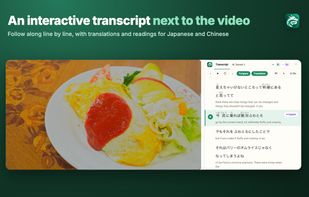
On YouTube, Netflix, Amazon Prime Video, Disney+, TED and Coursera, it shows an interactive transcript beside the video, with a translation under each line. Click any word to see its meaning, or ask for an AI explanation of the whole line: translation, key words, grammar and a usage tip, written in the learner's own language and adapted to their level.
Features:
- Interactive transcript beside the video, with a translation under each line
- Click a word for its meaning; AI lookups with the dictionary form and part of speech
- AI explanations of whole sentences in 19 languages, at beginner, intermediate or advanced level
- Pinyin for Chinese and furigana for Japanese
- Practice mode: fill in the blanks or write each line from dictation
- Save words, sentences and grammar points, and review them as flashcards with spaced repetition
- Export saved items as CSV, for example to Anki
- Keyboard shortcuts to replay, skip and auto-pause line by line
- iPhone app with YouTube video collections for each level, synced with the extension
Languages to learn: Chinese, Japanese, English, German, Spanish, French, Portuguese, Italian, Russian, Vietnamese and Indonesian. The interface and explanations are available in 19 languages.
Free plan: the transcript, translations, basic word lookups and practice mode need no account. A free account adds saving, flashcards and a few AI explanations a day. Premium removes the limits.






 EU


 Bing-X added DracoLanguage as alternative to Language Reactor and Trancy

 Bing Xia


No comments or reviews, maybe you want to be first?