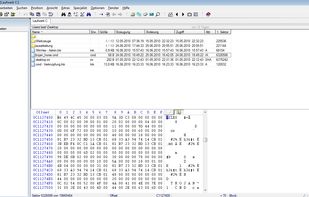
WinHex is a hexadecimal editor capable of opening disks, sectors, files (native support for FAT, NTFS, Ext2/3, ReiserFS, Reiser4, UFS, CDFS, UDF) and physical memory (RAM). It can read, write and extract data for a further forensic analysis.

DiskExplorer – Floppy disk image editor is described as 'DiskExplorer is a tool with a graphical user interface that supports working with floppy disk (and some hard drive) images of various layouts and formats. Originally a Japanese-only application, an English version has been made available since 2001' and is an app. There are five alternatives to DiskExplorer – Floppy disk image editor for Windows and MS-DOS. The best DiskExplorer – Floppy disk image editor alternative is WinHex. It's not free, so if you're looking for a free alternative, you could try ImageDisk or DiskPixie. Other great apps like DiskExplorer – Floppy disk image editor are WinImage and VGA-Copy.
WinHex is a hexadecimal editor capable of opening disks, sectors, files (native support for FAT, NTFS, Ext2/3, ReiserFS, Reiser4, UFS, CDFS, UDF) and physical memory (RAM). It can read, write and extract data for a further forensic analysis.

WinImage is a fully-fledged disk-imaging suite for easy creation, reading, and editing of many image formats and filesystems, including DMF, VHD, FAT, ISO, NTFS, and Linux.

Every old disk image format in one place. Open an ISO, a floppy dump (.IMA), or a raw BIN/CUE or CCD CD rip and browse it like a folder — select what you want and extract it, no mounting or command-line archaeology required.


VGA-Copy was created by the German software developer Thomas Mönkemeier. The first public version of VGA-Copy was the version 2.0. Later versions were published under the names VGA-Copy Pro and VGA-Copy/386. Some earlier versions were published by cdv Software Entertainment.