Discrity sits in your Mac's menu bar and tells you, in plain words, what is using your camera, microphone and speaker, and what used them before.
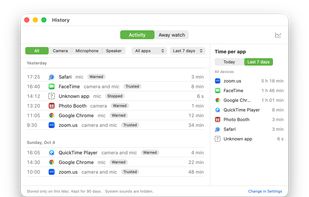
Usage history: every time an app turns on your camera, microphone or speaker, Discrity records which app, when, and for how long. Filter by device, app and day, see a daily chart, and spot the app that switched on your mic at 3 a.m. You can also check which addresses an app was connected to while it used your camera or mic. The history stays on your Mac.
See and stop: see which app is using each device right now and for how long. One button mutes the microphone and closes every app using the camera or mic, then tells you exactly what it stopped. You can also use a keyboard shortcut or a floating stop button.
Calm alerts: Discrity names the app within about two seconds. Apps you trust only change the menu bar icon. New apps get a short notice that hides itself. Apps it can't identify get a warning that stays until you respond.
Away watch: lock your Mac and walk away. When you return, Discrity reports any keyboard, mouse or trackpad use, lid opening, power cable or USB changes while you were gone.
Speaker guard: when headphones disconnect, the speakers are muted so nothing plays out loud by surprise.
Private by design: no account, no upload, no analytics. Discrity only sees whether a device is on, never the content: it never records audio, video, screenshots or typed text. It goes online only to check your license and, when you ask, for updates.
Honest about limits: Discrity warns and stops apps after they start, not before, and it is not antivirus.
€7.99 one-time purchase, no subscription. Free 7-day trial with every feature. Requires macOS 14 or later.privacy, webcam, microphone, menu bar, security, monitoring






 EU
EU


 Jiaming added Discrity as alternative to OverSight, Micro Snitch and Micro Sniff


 OJ-Studio

No comments or reviews, maybe you want to be first?