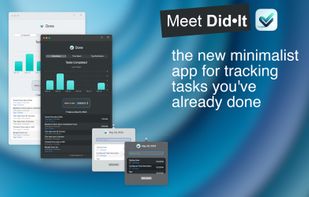
Did•It is a minimal menu bar app dedicated to tracking your completed tasks. Unlike traditional to-do apps, Did•It focuses on what you’ve already achieved, helping you keep a clear record of your accomplishments.
Whether you’re tracking tasks related to a work project, indie development, customer initiatives, or personal achievements, Did•It makes it simple to log your completed work efficiently.
Key Features:
• Unobtrusive and Lightning Quick: Did•It lives in your menu bar, providing immediate access to log tasks with a single click.
• Automatic Time Logging: The time of entry is recorded automatically, with optional time-spent tracking.
• Tagging System: Assign tasks to specific projects or categories using customizable tags.
• Visual Insights: SwiftUI Charts provide visual representations of your task activity, showcasing distribution, time spent, and tag types over the last 7 days.
• Data Export: Export your logged tasks as CSV, JSON, or Text files to share with your team or report to your manager.
• Apple Reminders Integration: Sync your completed Apple Reminders to Did•It
• Shortcuts Support: Integrate task logging into your workflows with the built-in Siri Shortcuts support.
Privacy and Security:
• Your data remains entirely on your device, with no third-party servers involved. For more details, refer to our Privacy Policy.
Easy Entry:
• Menu Bar Integration: Accessible from the menu bar for quick task entry.
• Automatic Time Logging: Automatically logs the time of task entry.
• Optional Time Tracking: Add time spent on tasks.
• Tag Assignment: Use tags for project tracking and categorization.
Charts:
• Visualize Activity: View task activity from the previous 7 days.
• Distribution and Time Spent: See task distribution, time spent, and tag types.
• SwiftUI Powered: Utilizes Apple’s SwiftUI Charts for dynamic visual insights.
Data Export:
• Custom Date Range: Select the range for exporting data.
• Multiple Formats: Export to CSV, JSON, or Text file.
• Team Sharing: Share exported data with your team or management.




No comments or reviews, maybe you want to be first?