Dev Workbench is a native macOS application that brings 16 developer utilities into one place for debugging, inspecting data, testing expressions, and handling everyday development tasks.
Unlike simple converter collections, Dev Workbench also supports more advanced workflows such as analyzing structured log files and querying local datasets with SQL.
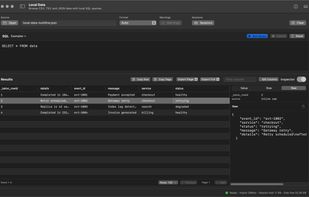
Local Data Analysis
Import CSV and JSON files into a DuckDB-powered workbench and explore them using SQL queries. Inspect rows, individual fields, and source data without first setting up a separate database server. Designed for developers working with exported application data, API responses, and diagnostic datasets.
Log Analyzer
Analyze downloaded application logs locally, including JSONL, key-value, and supported access-log formats. Filter by log level, search events, inspect structured fields and surrounding context, and explore activity through time-based charts. Supported data can also be handed off to Local Data for SQL-based investigation.
Developer Utilities
- JSON Tools: Format, validate, repair, and query JSON using jq.
- JSON/YAML: Convert and format structured data.
- JWT: Decode and inspect tokens, with Pro capabilities for signature verification and token creation.
- Cron: Explain cron expressions and preview scheduled runs.
- Epoch Time: Convert timestamps across formats and time zones.
- Regex: Test regular expressions, explore matches, and work with replacements.
- cURL to Code: Convert cURL commands into Python, Go, Java, and JavaScript code.
- Text Diff: Compare text and inspect changes.
- URL Parser: Inspect, modify, and rebuild URLs.
- IP/CIDR: Explore IP addresses, networks, and subnet information.
- Text Encoding: Encode and decode Base64, Base32, Base58, hexadecimal, and Ascii85.
- ID Generator: Generate UUIDs and ULIDs.
- Color: Convert color formats, evaluate contrast, and generate palettes.
- Image Data URI: Convert local images into embeddable data URIs.
Privacy and Pricing
Most processing happens locally on your Mac. Dev Workbench does not require an account and does not include advertising, tracking, or application analytics. Network access is used for explicitly requested operations such as running cURL commands and loading web previews.
All 16 workbenches have free functionality. Dev Workbench Pro is available as a $29.99 one-time purchase, unlocking advanced capabilities and higher limits in selected workbenches. No subscription is required.
Requires macOS 14 or later.







 duraipandian added Dev Workbench as alternative to DevUtils, DevToys, CyberChef, Boop and 1 more


No comments or reviews, maybe you want to be first?