
Deta Studio icon
Deta Studio icon

Deta Studio

 1 like

PDF markup and drawing review for Mac and Windows, with an $89 perpetual desktop license, a 30-day trial and optional cloud collaboration and takeoffs.
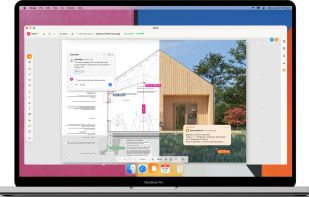
Deta Cloud drawing review in the Mac desktop app, showing markups, dimensions and shared comments.

Cost / License

  • Freemium (Pay once or Subscription)
  • Proprietary

Application type

Since

  • New

Platforms

  • Mac
  • Windows
  • Online
1like
0articles
Save

Features

Properties

Features

Highlights All activities

Deta Studio News & Activities

Recent activities

Deta Studio information

  • Developed by

    US flagDeta Studio
  • Licensing

    Proprietary and Freemium product.
  • Pricing

    One time purchase that costs $89, and / or subscription ranging between $15 and $20 per month + free version with limited functionality.
  • Alternatives

    4 alternatives listed
  • Badge

    Get an embeddable badge for Deta Studio
  • Supported Languages

    • English
Deta Studio was added to AlternativeTo by Deta-Studio on and this page was last updated .

No comments or reviews, maybe you want to be first?

Official Links

What is Deta Studio?

Deta Studio is a PDF markup and drawing-review app for architects, engineers and contractors on Mac and Windows. A single $89 perpetual desktop license covers both platforms, with a 30-day desktop trial. Deta Cloud adds collaborative drawing review, version branches and quantity-takeoff tables, accessible in the desktop app or a browser, with a permanent free tier and paid plans.

Review drawings with redlines, highlights, comments, callouts and revision clouds. Measure lengths and areas and count items directly on calibrated sheets. Build quantity-takeoff tables from drawing markups, organize quantities by room or other fields, and use formulas that update as the marked quantities change.

Compare PDF revisions with overlays to inspect changes. Keep drawing versions and separate review branches, preserving the context of each review. Shared drawings and live collaboration let teams review the same documents together.

The Mac and Windows desktop apps open, mark up and save local PDFs offline. Deta Cloud provides a shared workspace in a browser or the desktop app, with Google Drive and Dropbox import and save-back.

The desktop license costs $89 one-time, includes one year of new desktop features, and has a 30-day trial. Cloud Free includes one workspace, three members and five documents. Cloud Pro costs $15 per user per month and Cloud Studio costs $20 per seat per month, billed monthly with no annual commitment required. Discounted annual plans are also available. Paid cloud plans include desktop access while subscribed.

Deta Studio Videos