DesktopOrganizer icon

DesktopOrganizer

 Like

Free open-source desktop organizer for Windows: groups your real desktop icons into collapsible, hover-expanding panels, a free alternative to Stardock Fences.
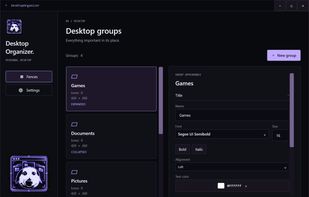
Groups page: create groups and customize their title and colors

Cost / License

  • Free
  • Open Source (MIT)

Since

  • New

Updated

  • Updated Nov 2026

Platforms

  • Windows
0likes
0articles
Save

Features

Features

Highlights All activities

DesktopOrganizer News & Activities

Recent activities

DesktopOrganizer information

AlternativeTo Category

OS & Utilities

GitHub repository

  •  2 Stars
  •  0 Forks
  •  0 Open Issues
  •   Updated  
View on GitHub

Popular alternatives

View all
DesktopOrganizer was added to AlternativeTo by Saintose on and this page was last updated .

No comments or reviews, maybe you want to be first?

What is DesktopOrganizer?

DesktopOrganizer is a free, open-source (MIT) desktop organizer for Windows 10 and 11 in the spirit of Stardock Fences. It groups your desktop icons into translucent panels ("groups") that you can move, resize, collapse and expand directly on the desktop.

The icons inside a group are the real Explorer desktop icons, not copies: clicks, double-clicks, multi-select and drag and drop keep working natively. There is no DLL injection, no overlay and no replacement of Explorer.

Features:

  • Collapsible groups with smooth animation; collapsed groups can expand when you hover over them
  • Move and resize groups on the desktop; groups snap to screen edges and to each other (hold Alt to place freely)
  • Auto-sort rules: new files on the desktop with a matching name (for example *.png, .lnk, Steam) join the right group automatically
  • Customizable title font, size, alignment and colors, plus separate color and opacity for the header, body and border
  • Drag icons into a group or out of it
  • Runs from the system tray, optional autostart, no administrator rights required
  • Interface in English and Russian
  • Per-user installer or portable zip, no .NET runtime needed

Icons of collapsed groups are hidden with the standard Windows Hidden file attribute while the app runs, and they are restored when you exit from the tray menu or uninstall. If the app ever crashes, run DesktopOrganizer.App.exe --RestoreHidden=true to restore them.