


Desktop Whiteboard
Desktop Whiteboard is a sleek and intuitive Windows app designed to revolutionize the way you interact with your desktop. Unlike traditional drawing tools that force you to switch between windows, Desktop Whiteboard lets you draw directly over your desktop, effortlessly and...
Cost / License
- Pay once
- Proprietary
Platforms
- Windows

Desktop Whiteboard
Features
- No registration required
- Built-in Color Picker
- Works Offline
- Ad-free
Tags
- productivity
- Productivity Tool
- organizer
Desktop Whiteboard News & Activities
Recent activities
- moojetexecutive added Desktop Whiteboard
- POX updated Desktop Whiteboard
- moojetexecutive liked Desktop Whiteboard
Desktop Whiteboard information
What is Desktop Whiteboard ?
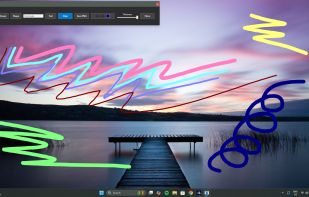
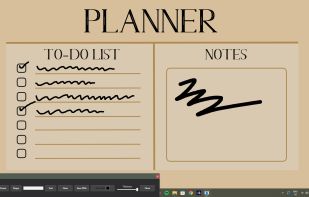
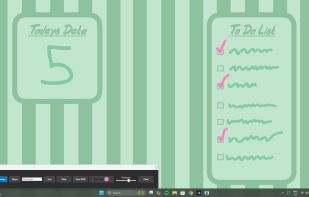
Desktop Whiteboard is a sleek and intuitive Windows app designed to revolutionize the way you interact with your desktop. Unlike traditional drawing tools that force you to switch between windows, Desktop Whiteboard lets you draw directly over your desktop, effortlessly and without interruption. Whether you’re brainstorming ideas, jotting down quick notes, sketching diagrams, or simply doodling, this app keeps your workflow smooth and uninterrupted.
With a variety of pen sizes and colors, plus options to add shapes and text, Desktop Whiteboard offers versatile tools tailored to boost your productivity and organization. You can open new tabs or windows as usual without disrupting your drawings, making multitasking seamless. When you’re done, save your masterpiece or notes as a photo to revisit anytime.
Perfect for professionals, students, creatives, and anyone looking to enhance their desktop experience, Desktop Whiteboard transforms your screen into a flexible canvas for ideas and organization.
Key Features:
- Draw Directly Over Your Desktop: Sketch, write, or doodle without switching away from your active tasks.
- Seamless Multitasking: Open new windows or tabs without disrupting your drawings.
- Customizable Pen Tools: Choose from multiple pen sizes and a wide color palette to suit your style and needs.
- Add Shapes and Text: Enhance your notes or drawings with clear shapes and text annotations.
- Save Your Work: Capture your notes or sketches as high-quality image files for future reference.
- Lightweight and Easy to Use: Minimal setup with an intuitive interface designed for quick access and usability.
- Enhances Productivity & Organization: Ideal for planning, brainstorming, note-taking, and creative expression.