





Deleterino
Like
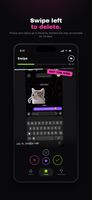
Your camera roll is full of screenshots you needed once, blurry shots and receipts from 2021. Deleterino lets you go through them one photo at a time: swipe left to delete, swipe right to keep.



+4


Cost / License
- Freemium (Subscription)
- Proprietary
 EU
EUPlatforms
- iPhone
- Android

Features
Highlights All activities
Deleterino News & Activities
Recent activities
- deleterino added Deleterino
 deleterino added Deleterino as alternative to Swipewipe, PhotoSwooper, CleanMyPhone, CleanSweep and 8 more

Developed by
 Niklas Mollenhauer
 Licensing
Proprietary and Freemium product.Pricing
Subscription ranging between $3 and $30 per month + free version with limited functionality.Alternatives
12 alternatives listedBadge
Get an embeddable badge for DeleterinoSupported Languages




No comments or reviews, maybe you want to be first?