

Decktly icon
Decktly icon

Decktly

Visually edit HTML presentations. Change text and layouts, add charts and tables, leave comments, and save your work as HTML.
Decktly screenshot 1

Cost / License

  • Free
  • Proprietary

Application type

Platforms

  • Online  Browser version available
  • Windows
  • Mac  Apple Silicon only
0likes
0articles
Save

Features

Properties

  1.  Privacy focused
  2.  AI-Powered

Features

  1.  Works Offline
  2.  Ad-free
  3.  WYSIWYG HTML Editor
  4.  No Tracking
  5.  WYSIWYG Support
  6.  No Coding Required
  7.  Support for MarkDown
  8.  Drag and Drop
  9.  Visual Editing
  10.  Team Collaboration
  11.  Interactive Presentations

Decktly News & Activities

Highlights All activities

Recent activities

Decktly information

Decktly was added to AlternativeTo by Decktly on and this page was last updated .

No comments or reviews, maybe you want to be first?

What is Decktly?

Decktly is a visual editor for HTML presentations and interactive decks. Open an existing HTML file, edit it on the page, and save your changes back to HTML.

It is built for people who use AI tools such as ChatGPT or Claude to create presentations and then need to make changes themselves. Correct a heading, move an image, adjust a chart, or leave a comment without prompting the AI again for each revision.

Features include:

  • Direct text editing and formatting
  • Moving, resizing, and aligning elements
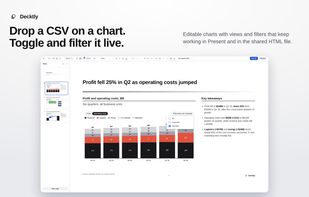
  • Charts, tables, shapes, and images
  • Slide masters for consistent layouts and styling
  • Comments stored within the HTML file
  • Presentation mode
  • Optional AI assistance -Markdown support (.md files are editable visually too)

Decktly keeps presentations in HTML, including their interactive elements. Saved decks can be opened in a browser and shared as files.

Manual editing happens locally without uploading the deck to Decktly. Optional AI features connect to the selected provider. Decktly is available for Windows, Apple Silicon Macs, and supported browsers.

Decktly Videos

