


CursorLang
Like
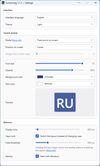
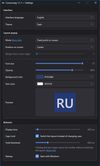
CursorLang is a lightweight, non-intrusive Windows utility that displays your active keyboard layout right where you type — next to the text caret or mouse cursor.


Cost / License
- Free
- Open Source (MIT)
Since
- New
Platforms
- Windows

Features
Highlights All activities
CursorLang News & Activities
Recent activities
 Volodymyr Forfutdinov added CursorLang as alternative to reLayout
- Aleksandr Neichev added CursorLang
 Aleksandr Neichev added CursorLang as alternative to Punto Switcher, Caramba Switcher and dotSwitcher


Developed by
 Aleksandr Neichev
 Licensing
Open Source (MIT) and Free product.Alternatives
6 alternatives listedBadge
Get an embeddable badge for CursorLangSupported Languages



No comments or reviews, maybe you want to be first?