


CSVpad
CSVpad is a handy free CSV (Comma-separated values) editor.
 Greece
 EU
EU
Features
CSVpad News & Activities
Recent News
Recent activities
- TBayAreaPat reviewed CSVpad
I tried to do a copy/paste from a Google Drive Spread sheet to CSV Pad and it didn't happen in cell form. Then I realized, I didn't really need to. Google made things easy enough.
- chaunceygardener reviewed CSVpad
No text-to-column feature. If the file lacks a header, the separator can't be changed. Columns can't be renamed. Drag-and-drop doesn't work on the executable—only within the app window. In these aspects, it's less capable than Notepad. However, it's sufficient for visualizing data and making small edits.


What is CSVpad?
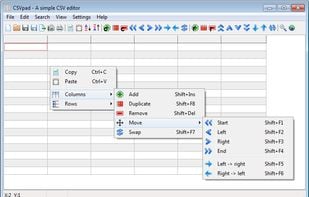
CSVpad is a handy free CSV (Comma-separated values) editor. It support's unicode and it is a portable application. CSVpad can manipolate columns and rows. Export CSV files into html / xml / OpenDocument Spreadsheet (ods) and Microsoft Excel 8.0 (xls) files. Before downloading CSVpad take a look at the online documentation. CSVpad is based on the DMcsvEditor CSVpad works under Windows 8, Windows 7, Windows Vista, Windows XP & Linux.
Comments and Reviews
No text-to-column feature. If the file lacks a header, the separator can't be changed. Columns can't be renamed. Drag-and-drop doesn't work on the executable—only within the app window. In these aspects, it's less capable than Notepad. However, it's sufficient for visualizing data and making small edits.
I tried to do a copy/paste from a Google Drive Spread sheet to CSV Pad and it didn't happen in cell form. Then I realized, I didn't really need to. Google made things easy enough.