
CSS Guardrail icon
CSS Guardrail icon

CSS Guardrail

CSS Guardrail is a safety tool for WordPress users who edit CSS directly inside the Theme File Editor or the Customizer’s Additional CSS panel.
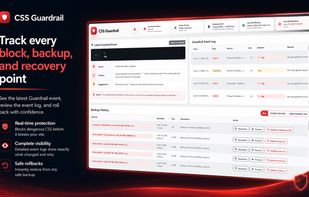
CSS Guardrail Main Dashboard, everything you need all in one place.

Cost / License

  • Pay once
  • Proprietary

Platforms

  • Online
  • Software as a Service (SaaS)
0likes
0comments
0articles

Features

No features, maybe you want to suggest one?

CSS Guardrail News & Activities

Highlights All activities

Recent activities

CSS Guardrail information

  • Developed by

    Loxx Software Development
  • Licensing

    Proprietary and Commercial product.
  • Pricing

    One time purchase (perpetual license) ranging between $29 and $99.
  • Alternatives

    3 alternatives listed
  • Supported Languages

    • English

AlternativeTo Categories

DevelopmentBackup & SyncSecurity & Privacy
CSS Guardrail was added to AlternativeTo by Nick Laux on and this page was last updated .
No comments or reviews, maybe you want to be first?

What is CSS Guardrail?

CSS Guardrail is a safety tool for WordPress users who edit CSS directly inside the Theme File Editor or the Customizer’s Additional CSS panel.

Before your changes are saved, the plugin scans the CSS for risky rules that could damage the layout, hide content, break navigation, or make the site difficult to use. Serious problems are blocked, while less dangerous issues are shown as warnings so you can review them before continuing.

CSS Guardrail also creates backups of previous CSS versions, making it easy to preview, download, or restore an earlier version when something goes wrong. Its event log records scans, warnings, blocked saves, and rollbacks, giving site owners and developers a clear history of what changed.

The plugin is designed for freelancers, agencies, site administrators, and WordPress users who want the freedom to edit CSS without one small mistake taking down an entire site.

Key features include:

Pre-save CSS scanning Critical and high-risk rule blocking Clear warnings with accurate line numbers Automatic CSS backup history Preview, download, and rollback tools Duplicate-warning detection Activity and event logging Support for the Theme File Editor and Additional CSS No coding workflow changes required

CSS Guardrail does not replace a code editor or write CSS for you. It acts as a final safety check between your CSS changes and the Save button.

CSS Guardrail Videos