CrossHair is a tiny menu-bar utility for when you need to point at one thing on screen, exactly.
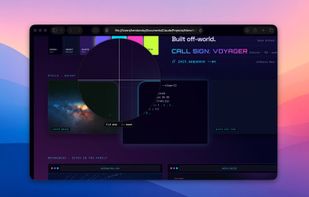
Press a global shortcut. A thin pair of lines crosses at your cursor, all the way to the edges of the screen — surgical, not decorative, visible on any background. Press it again, gone.
Press a different shortcut. A circular pixel loupe appears around the cursor, with a built-in reticle that runs along one of the grid lines so you always know which pixel you're on. Adjust the glass size and zoom with the keyboard while it's open.
Two shortcuts and the rest of the time it stays out of the way.
What's inside
• Fullscreen crosshair. Default shortcut ??X — rebindable. Thin lines crossing at the cursor, drawn over a transparent overlay that spans the whole screen. Two-pass dark + light stroke at 0.55 alpha so it reads on white, on black, and on everything in between, without dimming the content underneath. Esc dismisses.
• Pixel loupe. Default ??L — rebindable. A circular zoom centered on the cursor, with an in-glass reticle that coincides with the central grid line for unambiguous pixel targeting. Optional pixel grid (toggle with P) for when you're picking colors or counting pixels. Size: press 1 or 2 to shrink or grow. Zoom: press , or . — your settings persist between sessions.
• Arrow-key nudge. Arrow keys move the cursor one pixel at a time while either overlay is up; Shift-arrow moves ten. For pixel-perfect targeting without a tablet.
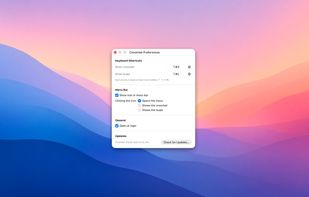
• Menu-bar icon. Optional — hide it and you've still got the hotkeys. A primary click can open the menu (classic), summon the crosshair, or summon the loupe — your choice. Right-click always opens the menu so Preferences and Quit stay reachable.
• Open at login. Standard system toggle in Preferences > General. CrossHair registers with the system the modern way (Service Management); System Settings > Login Items remains the source of truth.
Quiet, native, no telemetry. Pure SwiftUI + AppKit. Tiny binary, instant launch, no background services. The loupe asks for Screen Recording permission the first time it's used so it can read the pixels under your cursor — nothing is recorded, saved, or transmitted; CrossHair forgets every frame the moment the next one arrives.










No comments or reviews, maybe you want to be first?