Convertica icon
Convertica icon

Convertica

Convertica is a free, privacy-first online toolkit with 40+ PDF and file tools: convert PDF to/from Word, Excel, PowerPoint, images, HTML, EPUB and Markdown; edit, sign, watermark, merge, split and compress PDFs; run OCR; protect or unlock PDFs and ZIP. No registration, no watermarks.
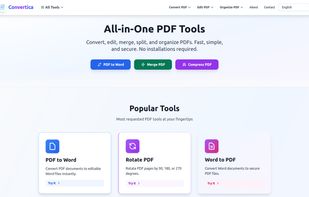
main page

Cost / License

  • Free
  • Proprietary

Application type

Platforms

  • Online
2likes
0comments
0articles

Features

Properties

  1.  Privacy focused
  2.  Lightweight

Features

  1.  PDF compression
  2.  Sign PDF files
  3.  No Tracking
  4.  Split PDF files
  5.  OCR
  6.  PDF annotation
  7.  Dark Mode
  8.  Combine PDF
  9.  No registration required
  10.  PDF encryption
  11.  Ad-free
  12.  Convert PDF to image
  13.  Convert EPUB to PDF
  14.  Convert PDF to Powerpoint
  15.  Convert PDF to Word document
  16.  No Watermark
  17.  Convert PDF to EPUB
  18.  PDF OCR
  19.  Convert PDF to Excel document

Convertica News & Activities

Highlights All activities

Recent activities

Convertica information

  • Developed by

    PL flagConvertica
  • Licensing

    Proprietary and Free product.
  • Alternatives

    12 alternatives listed
  • Supported Languages

    • English
    • Russian
    • Spanish
    • Hindi
    • Indonesian
    • Arabic
    • Polish
Convertica was added to AlternativeTo by nikitakrivd on and this page was last updated .
No comments or reviews, maybe you want to be first?

What is Convertica?

Convertica is a free online platform for working with PDF documents and everyday file formats directly in the browser. It brings together more than 40 tools in one place, so you can convert, edit, organize and secure files without installing software or creating an account.

On the conversion side, Convertica handles PDF to Word, Excel and PowerPoint and back again, PDF to and from JPG and PNG images, HTML to PDF, PDF to plain text, and less common formats such as EPUB and Markdown. It also converts and optimizes images, handles HEIC photos from iPhones, and generates favicons and ICO files.

Beyond conversion, you can merge and split PDFs, remove, extract, rotate and reorder pages, compress large files, add page numbers, watermarks and text, sign documents, and flatten or crop pages. Security tools let you password-protect or unlock PDFs and ZIP archives, and an OCR tool extracts text from scanned images. There is also a PDF/A tool for creating archival, standards-compliant documents.

Convertica is built around privacy. Files are processed online and deleted automatically, there is no tracking, and the interface stays ad-free and lightweight with a dark mode. It works on any modern device, can be installed as a Progressive Web App, and is available in English, Russian, Spanish, Hindi, Indonesian, Arabic and Polish.

The core tools are free with no sign-up required. A free account and optional premium plans raise conversion limits and unlock extras such as saved workflows, background processing of large jobs, and higher page and file-size limits for heavy documents.