



Control Screen Orientation
Like
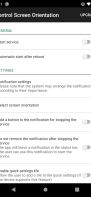
Easily control your screen orientation from the notification bar.
+2
Cost / License
- Freemium (Pay once)
- Proprietary
Platforms
- Android

Features
No features, maybe you want to suggest one?
Tags
Control Screen Orientation News & Activities
Highlights All activities
Recent activities
No activities found.
Control Screen Orientation information
Developed by
ah_appsLicensing
Proprietary and Freemium product.Pricing
One time purchase (perpetual license) that costs up to $1 + free version with limited functionality.Alternatives
1 alternatives listedSupported Languages
- English

No comments or reviews, maybe you want to be first?
Post comment/reviewWhat is Control Screen Orientation?
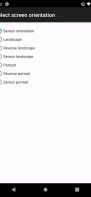
Control your screen orientation very easily from your device notification bar. Prevent screen auto rotation and choose the screen orientation that you want with any application Available orientations: Landscape Reverse landscape Sensor landscape Portrait Revers portrait Sensor portrait Sensor orientation (auto rotation) PLEASE NOTICE THAT: Some screen orientations may not available in some devices
