

Colbot icon
Colbot icon

Colbot

Colbot is a general-purpose, AI-powered data extraction tool that turns unstructured documents into clean spreadsheet rows. Connect a Google Sheet and drop in PDFs, Word documents, Excel files, images or CSVs.
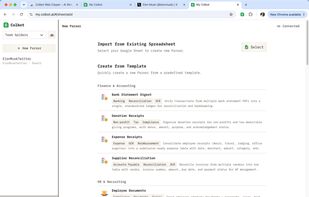
You can import existing spreadsheet from your Google sheets, or create new parser from templates.

Cost / License

  • Subscription
  • Proprietary

Platforms

  • Online
  • Software as a Service (SaaS)
  • Google Chrome
1like
1comment
0articles

Features

Properties

  1.  AI-Powered

Features

  1.  Import CSV Data
  2.  Team Collaboration
  3. Google Sheets icon  Google Sheets integration
  4.  Convert PDF to Excel document
  5. Microsoft Excel icon  Export to Excel

Colbot News & Activities

Highlights All activities

Recent activities

Colbot information

  • Developed by

    HK flagColbot
  • Licensing

    Proprietary and Commercial product.
  • Pricing

    Subscription that costs $10 per month.
  • Alternatives

    16 alternatives listed
  • Supported Languages

    • English
    • Chinese

Our users have written 1 comments and reviews about Colbot, and it has gotten 1 likes

Colbot was added to AlternativeTo by Hanc Leo on and this page was last updated .

Comments and Reviews

   
Hanc Leo
0

Very easy to use, no code, AI native.

Review from a new or low-activity account — shown here, but not counted in the app rating.

What is Colbot?

Colbot is a general-purpose, AI-powered data extraction tool that turns unstructured documents into clean spreadsheet rows. Connect a Google Sheet and drop in PDFs, Word documents, Excel files, images or CSVs.

Colbot reads them, reasons over the content to derive the fields your sheet needs, and appends new rows automatically. It goes beyond plain format conversion: the AI infers values that aren't explicitly stated in the source.

Let rows write directly to your sheet, or turn on an optional review flow to approve extractions first, with every step auditable.

Colbot also supports team roles and permissions, and can be triggered via the web app or a Chrome browser extension (Colbot Web Clipper).

Official Links