


Code::Blocks
Code::Blocks is a free C++ IDE built to meet the most demanding needs of its users. It is designed to be very extensible and fully configurable.
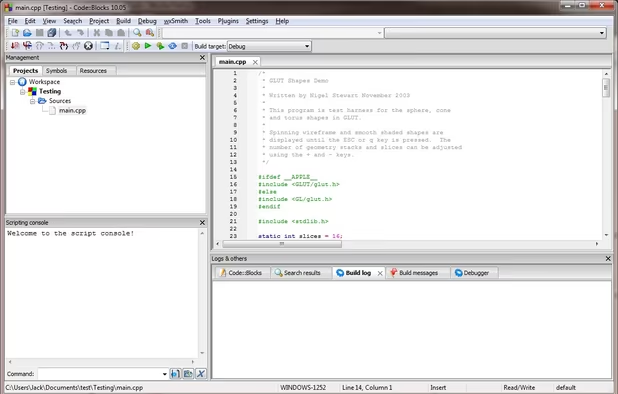

Features
- C++
- C support
- No registration required
- Extensible by Plugins/Extensions
- Support for scripting
- Portable
- Leadfeeder integration
- Learn with Flashcards
Code::Blocks News & Activities
Recent News
Recent activities
- paranoiddownloader liked Code::Blocks
 POX added Code::Blocks as alternative to Notepad.exe
- Maria-Oliver liked Code::Blocks
 Maksa added Code::Blocks as alternative to DecSoft App Builder
 POX added Code::Blocks as alternative to xtool
 POX added Code::Blocks as alternative to roobuilder


Featured in Lists

These are all the software I use on my windows machine. I am privacy freak. So, I mostly use open source software. …

A list with 807 apps by AmileyaRyver without a description.

A list with 39 apps by davidlukmanulhakim without a description.
What is Code::Blocks?
Code::Blocks is a free C++ IDE built to meet the most demanding needs of its users. It is designed to be very extensible and fully configurable.
An IDE with all the features a developer need, having a consistent look, feel and operation across platforms.
Built around a plugin framework, Code::Blocks can be extended with plugins. Any kind of functionality can be added by installing/coding a plugin. For instance, compiling and debugging functionality is already provided by plugins!
Code::Blocks information
Developed by
Code::Blocks TeamLicensing
Open Source and Free product.Rating
Average rating of 4.5Alternatives
60 alternatives listedSupported Languages
- English


Comments and Reviews
Code::Blocks feels like an IDE that came straight out of the 90s – and I like it for just that reason. From the GUI to project and build management, it feels very old-fashioned through and through. And the truth of the matter is, a lot of things were actually quite a bit better in many respects, back when they were simpler.
I like working with fancy IDE monsters like Visual Studio, Eclipse, or IntelliJ, too. But for all the comfort those solutions add, they also add layers over layers of complexity. That can quickly turn into a problem as soon as you want to do something slightly differently than the "official" workflow suggests, and chances are usually that you'll want to, sooner or later. Then, managing and fixing project configurations and build setups can turn into an endless time sink.
Code::Blocks keeps things close to the basics, not messing with your code or file structure unless you ask it to. It's simple, it's light-weight, it keeps your projects portable. That is a very valuable quality, as everybody who is not married to a single framework or IDE can attest. The code I write should be entirely mine, and Code::Blocks puts that principle at the top-most priority.
The good thing is that the IDE is used and worked on by many real and active developers, though, so it will still integrate with a lot of tools and modern concepts. From documentation generators to static code analysis, you can configure it to use many more modern and genuinely useful helpers. It's as if the spirit of C++ development in the 90s lived on, adopting carefully selected paradigm shifts over the years, but not giving up its original soul.
Don't dismiss it as a toy that couldn't possibly compete with major-vendor IDEs. It doesn't want to, and it doesn't need to. It's a very good C++ development environment for the programmer who couldn't care less about the hypes and the buzzwords, and just wants to get something done.
I use Code::Blocks quite often for C++ programming. I prefer it over Visual Studio because it's free and less bloated with features.
Code::Blocks is a very light but powerful IDE
Mature and easy to use
Its a very good site. I searched fot others sites, but anyone said me what I wanted My congratulations