CobraTV Pro icon
CobraTV Pro icon

CobraTV Pro

CobraTV Pro is a media player for your own Xtream Codes and M3U playlists. It runs on Android TV, Google TV, Fire TV, Android phones and tablets, Windows and Mac. It does not include any channels: you add your own playlist and the app organises it.
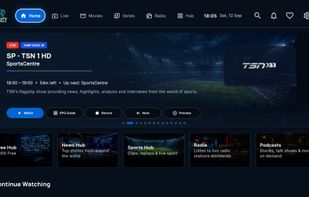
CobraTV Pro screenshot 1

Cost / License

  • Pay once or Subscription
  • Proprietary

Application type

Platforms

  • Android  Android 7.0 or newer. Not on Google Play: download the APK from cobratvnz.com.
  • Android TV  Android TV 7.0 or newer. Not on Google Play: install with the Downloader app, code 1157823.
  • Fire TV  Not in the Amazon Appstore: install with the Downloader app, code 1157823.
  • Windows  Windows 10 or 11. Installer from cobratvnz.com; updates itself.
  • Mac  macOS 11 or newer. Download the .dmg from cobratvnz.com. On first open, macOS may ask you to allow it under System Settings › Privacy & Security.
0likes
0articles
Save

Features

Properties

Features

Highlights All activities

CobraTV Pro News & Activities

Recent activities

CobraTV Pro information

  • Developed by

    NZ flagCobraTV NZ
  • Licensing

    Proprietary and Commercial product.
  • Pricing

    One time purchase ranging between $39 and $75, and / or subscription ranging between $12 and $41 per year.
  • Alternatives

    39 alternatives listed
  • Badge

    Get an embeddable badge for CobraTV Pro
  • Supported Languages

    • English
    • Spanish
    • French
    • German
    • Italian
    • Portuguese
    • Dutch
    • Polish
    • Romanian
    • Swedish
    • Turkish
    • Greek
    • Russian
    • Ukrainian
    • Arabic
    • Persian
    • Hebrew
    • Urdu
    • Hindi
    • Bengali
    • Thai
    • Vietnamese
    • Indonesian
    • Chinese
    • Japanese
    • Korean
CobraTV Pro was added to AlternativeTo by Jamie-Docherty on and this page was last updated .

No comments or reviews, maybe you want to be first?

Official Links

What is CobraTV Pro?

CobraTV Pro is a media player for your own Xtream Codes and M3U playlists. It runs on Android TV, Google TV, Fire TV, Android phones and tablets, Windows and Mac. It does not include any channels: you add your own playlist and the app organises it.

It has a TV guide up to 7 days ahead, as a list or a grid, with your own XMLTV guides merged in. It also does catch-up where your provider supplies it, reminders, and recording: record now, schedule from the guide, or repeat a show every day, weekday or weekend, to the device or a USB drive. Multi-view shows up to four live channels at once on TVs with 2 GB of memory or more. Films and series get poster pages with trailers and "More like this".

Link your TVs with a code and a PIN and they stay in step: favourites, groups, My List and Continue Watching follow you from room to room. It also shows which room is already using a provider line before you press play. Notify me tells every linked TV when a series you follow has a new episode.

You can set everything up from your phone: scan the QR code on the TV and add your playlist on the website. Playlist logins can be hidden from our server completely, and your devices share them end-to-end encrypted. A free hub of radio, podcasts, audiobooks, news, weather and trivia works with no playlist at all.

26 languages. 7-day free trial, no card needed.
