


CloudMounter
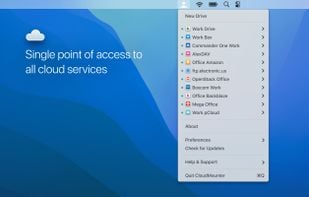
CloudMounter is a must-have tool for laptop users with low-capacity SSD-drives. You can easily mount most popular clouds as disks without having to download online files on the hard drive. As well as secure cloud files with data encryption.
Cost / License
- Pay once or Subscription
- Proprietary
Application types
Platforms
- Mac
- Windows

Features
Properties
- Lightweight
Integrations

 Google Drive
 MEGA
MEGA Dropbox


Features
- Cloud Sync
- Support for MEGA
- Mount FTP drives
- Mounting drives
- WebDAV Support
- Support for FTP
- Support for Dropbox


CloudMounter News & Activities
Recent News
Recent activities
 Nubbo added CloudMounter as alternative to Nubbo
- sukka liked CloudMounter
- bawermanadrian9 reviewed CloudMounter
Total game-changer 🙌 I can run my work and personal Dropbox at the same time without that annoying login/logout shuffle. Feels super smooth, like everything’s just on my Mac. Saves me stress and time—10/10 would recommend if you’re juggling multiple accounts!
- bawermanadrian9 liked CloudMounter
- jacoblawson3344 reviewed CloudMounter
I’ve been using CloudMounter for a while now, and it’s honestly been a lifesaver. As someone who juggles multiple Google Drive accounts, it’s a huge relief to be able to mount them all directly in Finder.
 consults3 added CloudMounter as alternative to Storj Object Mount
 jdakfkj333 added CloudMounter as alternative to Rclone GUI
- namdx1987 liked CloudMounter


Featured in Lists

A list with 43 apps by Reptevye without a description.
What is CloudMounter?
CloudMounter is a must-have tool for laptop users with low-capacity SSD-drives. You can easily mount most popular clouds as disks without having to download online files on the hard drive. As well as secure cloud files with data encryption. Choose one of your Dropbox, Google Drive and OneDrive accounts and manage them in Finder for free.
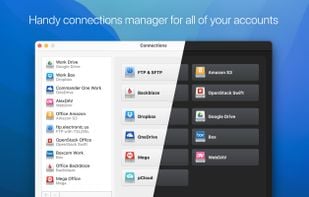
CloudMounter is a solid system utility for mounting cloud storages and web servers as local disks to your Mac. Connect to Dropbox, Google Drive, Amazon S3, Microsoft OneDrive, (S)FTP, WebDAV and OpenStack Swift servers in Finder, as if they are all hosted on your computer.
Features
CloudMounter is a very safe and comprehensive tool with a vast spectrum of supported cloud services and protocols.
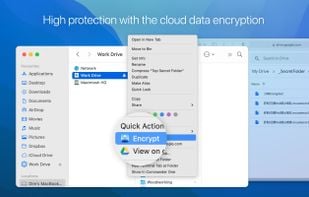
Cloud data encryption
CloudMounter keeps your online files protected with advanced encryption standard. Thus reducing cloud risks to minimum.
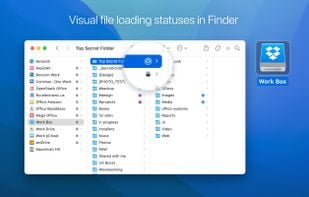
Integration with Finder
The integration with Finder is smooth and logical. Makes using the app even easier and comprehensive.
CloudMounter Videos

CloudMounter information
Developed by
 Electronic Team Inc.
 Licensing
Proprietary and Commercial product.Pricing
One time purchase ranging between $30 and $54, and / or subscription that costs $3 per month.Rating
Average rating of 4Alternatives
30 alternatives listedSupported Languages
- English
- Czech
- French
- German
- Italian
- Japanese
- Korean
- Portuguese
- Chinese
- Spanish


Comments and Reviews
CloudMounter is an amazing resource! It gives you the impression that you are working with local files by integrating cloud storage with your local environment in a seamless manner. incredibly practical and effective for handling several cloud accounts! 🌼
OneDrive link has been broken for months. Also, the updates are very infrequent.
If you have a problem, please write here and support@electronic.us will help you.
Total game-changer 🙌 I can run my work and personal Dropbox at the same time without that annoying login/logout shuffle. Feels super smooth, like everything’s just on my Mac. Saves me stress and time—10/10 would recommend if you’re juggling multiple accounts!
I’ve been using CloudMounter for a while now, and it’s honestly been a lifesaver. As someone who juggles multiple Google Drive accounts, it’s a huge relief to be able to mount them all directly in Finder.
Website claims support for WebDAV. Once evaluating the product, there is no evidence of WebDAV support anywhere in the application.
CloudMounter supports WebDAV connections. If you have a problem, please write here and support@electronic.us will help you.
While there is a Linux client, it depends upon older libraries that may not be available in modern (post 2020) versions of Linux.
Purchase options target Mac and Windows users, with no specific option for Linux.
Simple, elegant and effective. Useful for having a fast access to files in cloud storage services, without using space on the hard disk for the "complete" sync.