
Clocksmith icon
Clocksmith icon

Clocksmith

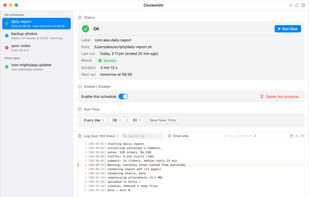
See every scheduled job on your Mac and know it actually ran. Run, pause, or reschedule launchd agents without the Terminal.
Clocksmith screenshot 1

Cost / License

  • Paid
  • Proprietary

Platforms

  • Mac
0likes
0comments
0articles

Features

  1.  Task Scheduling

Clocksmith News & Activities

Highlights All activities

Recent activities

Clocksmith information

  • Developed by

    Shawn Chiao
  • Licensing

    Proprietary and Commercial product.
  • Alternatives

    4 alternatives listed
  • Supported Languages

    • English
Clocksmith was added to AlternativeTo by shawnchiao on and this page was last updated .
No comments or reviews, maybe you want to be first?

What is Clocksmith?

Clocksmith is a native macOS utility that shows every scheduled background job (launchd agent) on your Mac in one window. Live status shows what is running, healthy, failed, or disabled. Last-run history is pulled from the system log, including start and end time, duration, and exit code, so silently failing jobs are visible at a glance. You can run any job immediately, enable or disable it, or change its daily run time, with an automatic configuration backup before every change. A full-height log console offers search, error filtering, and adjustable text size, and one click can hand a failing job's log to ChatGPT, Claude, or Gemini with the question pre-filled. Deliberately minimal: a monitoring dashboard, not a plist editor. No subscription, no telemetry, no network access. Signed and notarized. English and Traditional Chinese.