

ClipTyper
ClipTyper types clipboard text as real Windows keystrokes into RDP, KVM, serial consoles, and paste-blocked fields. Tray app, no admin rights, portable or installer.
Features
Properties
- Privacy focused
- Lightweight
Features
- No registration required
- Support for Multiple Monitors
- Portable
- Works Offline
- No Tracking
- Ad-free
- Support for Hotkeys
ClipTyper News & Activities
Recent activities
- unpaved028 added ClipTyper
- Maoholguin updated ClipTyper
- unpaved028 added ClipTyper as alternative to AutoHotkey, AutoKey, Type The Board and TyperTask
ClipTyper information
What is ClipTyper?
ClipTyper is a lightweight Windows tray app that types text from the clipboard as real keystrokes. It is built for the last mile: Remote Desktop, VDI, KVM and out-of-band consoles, serial terminals, and password fields where Ctrl+V is blocked, missing, or redirected away.
Copy any text, focus the target window, then press the hotkey (default Ctrl+Shift+T). ClipTyper reads plain clipboard text and simulates keyboard input into the active window. No agent on the remote side, no network path to the target, and no administrator rights.
Typical situations:
- Fullscreen RDP, Citrix Workspace, or VMware Horizon when clipboard redirection is disabled
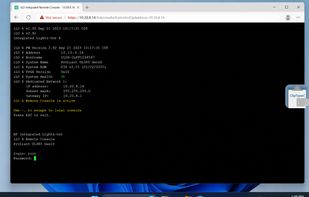
- HP iLO, Dell iDRAC, IPMI, and KVM-over-IP HTML5 consoles with no clipboard channel
- AWS EC2 / Azure serial consoles and hypervisor web consoles such as Proxmox or ESXi
- Microsoft Teams screen control or Zoom remote sessions where the viewer clipboard is not bridged
- Web forms and banking fields that block paste
- A floating overlay button covers fullscreen sessions that swallow global hotkeys. Optional credential auto-type splits username and password, sends Tab or Enter between them, and can clear the clipboard afterwards. Safety features include Escape abort, Stop Typing from the tray, focus-loss protection, UIPI elevation warnings, and plain-text cleanup.
ClipTyper is free and open source (MIT). It ships as a portable exe, a slim build, or a user-space installer, and is also available via Windows Package Manager (winget).




