ClipMargin icon
ClipMargin icon

ClipMargin

ClipMargin gives videos the margin that books have. A panel opens beside whatever you are watching, so you can write a note the moment you have a thought, without pausing, switching tabs, or losing your place.
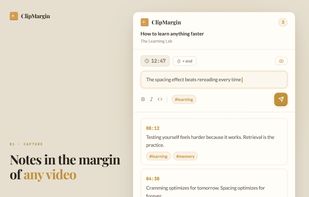
The notes panel open beside a video, with a note being written and earlier notes listed below it.

Cost / License

  • Free
  • Proprietary

Application type

Platforms

  • Google Chrome  A free account keeps your notes synced across devices.
1like
0articles
Save

Features

Features

Highlights All activities

ClipMargin News & Activities

Recent activities

ClipMargin information

AlternativeTo Categories

Office & Productivity, Web Browsers

Popular alternatives

View all
ClipMargin was added to AlternativeTo by amine_builds2 on and this page was last updated .

No comments or reviews, maybe you want to be first?

Official Links

What is ClipMargin?

ClipMargin gives videos the margin that books have. A panel opens beside whatever you are watching, so you can write a note the moment you have a thought, without pausing, switching tabs, or losing your place. That is the whole point: notes that cost you nothing to take while you watch.

Each note quietly remembers the moment it came from, so clicking it later reopens the video right there. Everything you write lands in one searchable web library, where tags pull a single topic together across different videos and platforms, and Markdown export means nothing is locked inside the app.

Videos are detected automatically on YouTube, Udemy, Vimeo, Skillshare, Dometrain and Instagram. On any other page with a video, right click it and choose "Take notes on this video".

Built for students reviewing lectures, developers following tutorials, researchers working through recorded talks and interviews, and anyone who wants to find what they learned weeks later.

ClipMargin Videos