Clip stack icon
Clip stack icon

Clip stack

 3 likes

Clip stack's notification is simple and powerful. You can switch the recent 5 texts just in notification. Notification will be displayed only when copying new text and you can dismiss it by swipe or even disable it by long press.
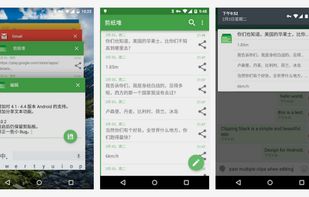
Clip stack screenshot 1

Cost / License

  • Free
  • Proprietary (MIT)

Application type

Since

  • Since 2016

Updated

  • Archived

Alerts

  • Discontinued

Platforms

  • Android
Discontinued

Project has been deprecated: https://github.com/heruoxin/Clip-Stack

3likes
0articles
Save

Features

Features

Highlights All activities

Clip stack News & Activities

Recent activities

No activities found.

Clip stack information

AlternativeTo Category

Office & Productivity

GitHub repository

  •  916 Stars
  •  311 Forks
  •  43 Open Issues
  •   Updated  (Archived)
View on GitHub

Popular alternatives

View all

Our users have written 1 comment or review about Clip stack, and it has gotten 3 likes.

Clip stack was added to AlternativeTo by wilfried18 on and this page was last updated .

Comments and Reviews

   
paulkudiyirippil
0

Stable, free and open-source alternative to Ditto on Android.

Review from a new or low-activity account — shown here, but not counted in the app rating.

Featured in Lists

Edge/Chrome Extensions

A list with 209 apps by trishafhhmoam without a description.
By Trisha Hoque209 appsUpdated

Official Links

What is Clip stack?

Clip Stack is the easy way to get multi-clipboard for Android. It's free, open-source, has no ads and sports a sleek, material design.

FEATURES

🌐 Unlimited Clipboards

Clip Stack can remember all your clipboard history and recover text after reboot. It's a clipboard manager,a user friendly notebook, and maybe a tiny GTD manager.

You can easily copy, share, star, delete, and merge every text.

🌐 Works Everywhere

Whatever phone, tablet, and wear, all Android devices are supported.

🌐 Powerful Notification

Clip stack's notification is simple and powerful. You can switch the recent 5 texts just in notification.

Notification will be displayed only when copying new text and you can dismiss it by swipe or even disable it by long press.

🌐 Floating Bubble

Floating bubble provides another easy way to access all texts without opening app.

For Android 🍭 Lollipop or above, floating bubble can follow the keyboard and auto show & hide when typing!

Note: Open floating bubble in settings.